

An internal knowledge base helps your team store, organize, and share company knowledge in one centralized location. It reduces time spent searching for information, improves onboarding, prevents knowledge loss, and makes collaboration easier across departments.
Without a structured system, employees often waste time digging through email chains, outdated PDFs, Slack messages, shared drives, and disconnected documents just to find basic information. That leads to duplicated work, slower onboarding, inconsistent processes, and reduced productivity.
An internal knowledge base solves this problem by creating a single source of truth for your organization.
Whether you're building a knowledge base for a remote team, a growing startup, or an enterprise organization, the right structure and strategy can dramatically improve how information flows across your company.
What Is an Internal Knowledge Base?
An internal knowledge base is a private system used to store and organize company knowledge, documentation, workflows, processes, and internal resources for employees.
It acts as a centralized hub where teams can quickly find the information they need to perform their jobs effectively.
Unlike external or customer-facing knowledge bases, an internal knowledge base is only accessible to employees and authorized stakeholders within the organization.
Companies commonly use internal knowledge bases to manage:
- Standard operating procedures (SOPs)
- Employee onboarding documentation
- HR policies
- Product documentation
- Training materials
- Technical troubleshooting guides
- Internal processes and workflows
- Sales and marketing resources
- Meeting notes and company updates
A well-structured internal knowledge base improves knowledge sharing across teams while reducing dependency on individual employees for information.
For example, instead of repeatedly asking coworkers how to complete a process, employees can simply search the knowledge base and find accurate, updated instructions instantly.
This becomes especially important for remote and hybrid teams where information can easily become fragmented across different tools and communication channels.

Why Building an Internal Knowledge Base Matters
Creating an internal knowledge base is no longer optional for growing organizations.
As teams scale, information naturally becomes harder to manage. Without a centralized knowledge management system, businesses often struggle with:
- Information silos
- Duplicate work
- Slow onboarding
- Inconsistent customer support
- Process confusion
- Knowledge loss from employee turnover
An internal knowledge base helps solve these challenges by making organizational knowledge accessible, searchable, and easy to maintain.
Here are some of the biggest benefits of building an internal knowledge base.
1. Improve Employee Productivity
Employees waste significant time searching for information across emails, chat apps, shared folders, and disconnected systems.
An internal knowledge base centralizes information into one searchable platform so employees can quickly find answers without interrupting coworkers or managers.
This reduces delays and allows teams to spend more time on meaningful work instead of repetitive information hunting.
2. Simplify Employee Onboarding
New hires need quick access to company processes, training materials, and policies to become productive faster.
An internal knowledge base creates a structured onboarding experience by organizing everything employees need in one place.
This reduces onboarding confusion and minimizes repetitive training questions for HR and managers.
3. Reduce Knowledge Loss
When employees leave a company, valuable institutional knowledge often disappears with them.
An internal knowledge base helps capture tribal knowledge before it is lost by documenting workflows, best practices, troubleshooting processes, and internal expertise.
This creates long-term operational stability.
4. Improve Collaboration Across Teams
Internal knowledge bases make cross-functional collaboration easier because information is no longer trapped inside departments.
Sales, support, marketing, HR, and engineering teams can all access relevant resources and stay aligned using shared documentation.
5. Create a Single Source of Truth
One of the biggest problems organizations face is outdated or conflicting information.
An internal knowledge base helps maintain consistency by ensuring employees always access the latest approved version of documents and processes.
This reduces mistakes and improves operational accuracy.
What Should Be Included in an Internal Knowledge Base?
The effectiveness of your internal knowledge base depends heavily on the quality and organization of the content inside it.
Your goal should be to create a centralized resource employees can rely on daily for accurate and up-to-date information.
While every company structures its internal knowledge base differently, there are several core content categories most organizations should include.
1. Company Information
This section helps employees stay aligned with the organization’s structure, goals, and leadership updates.
Examples include:
- Company mission and values
- Organizational charts
- Leadership directories
- Internal announcements
- Company policies
- Quarterly reports
- Team contact information
2. HR and Employee Resources
HR documentation is one of the most frequently accessed areas of an internal knowledge base.
Common examples include:
- Employee handbooks
- PTO and leave policies
- Benefits information
- Payroll procedures
- Performance review templates
- Workplace policies
- Compliance documents
Centralizing HR information reduces repetitive employee questions and improves onboarding efficiency.
3. Employee Onboarding Materials
Onboarding content helps new hires become productive faster.
This may include:
- New employee checklists
- Training guides
- Welcome documentation
- Department workflows
- Software tutorials
- Company terminology and acronyms
A structured onboarding knowledge base creates a smoother employee experience and reduces training bottlenecks.
4. Process Documentation and SOPs
Process documentation and standard operating procedures help maintain consistency across teams.
Your internal knowledge base should document:
- Step-by-step workflows
- Internal processes
- Approval procedures
- Escalation paths
- Troubleshooting instructions
- Operational checklists
Well-documented processes reduce confusion and help teams work more efficiently.
5. Sales and Customer Support Resources
Sales and support teams rely heavily on quick access to accurate information.
Examples include:
- Sales playbooks
- Product documentation
- Pricing details
- Customer support scripts
- FAQ documents
- Objection handling guides
- Competitive comparison sheets
This helps teams deliver faster and more consistent customer experiences.
6. Technical and Product Documentation
For SaaS and technical companies, product knowledge documentation is critical.
This section may include:
- API documentation
- System architecture
- Internal troubleshooting guides
- Product release notes
- Engineering workflows
- Development standards
Technical documentation also helps reduce dependency on senior employees for repetitive questions.
7. Marketing and Brand Assets
Marketing teams often use internal knowledge bases to organize:
- Brand guidelines
- Content calendars
- Campaign workflows
- Design assets
- Messaging frameworks
- Social media templates
This ensures brand consistency across the organization.
The Benefits of Using Internal Knowledge Base Software
The right internal knowledge base brings a host of advantages to your organization. For example, you can expect to:
1. Improve Employee Productivity
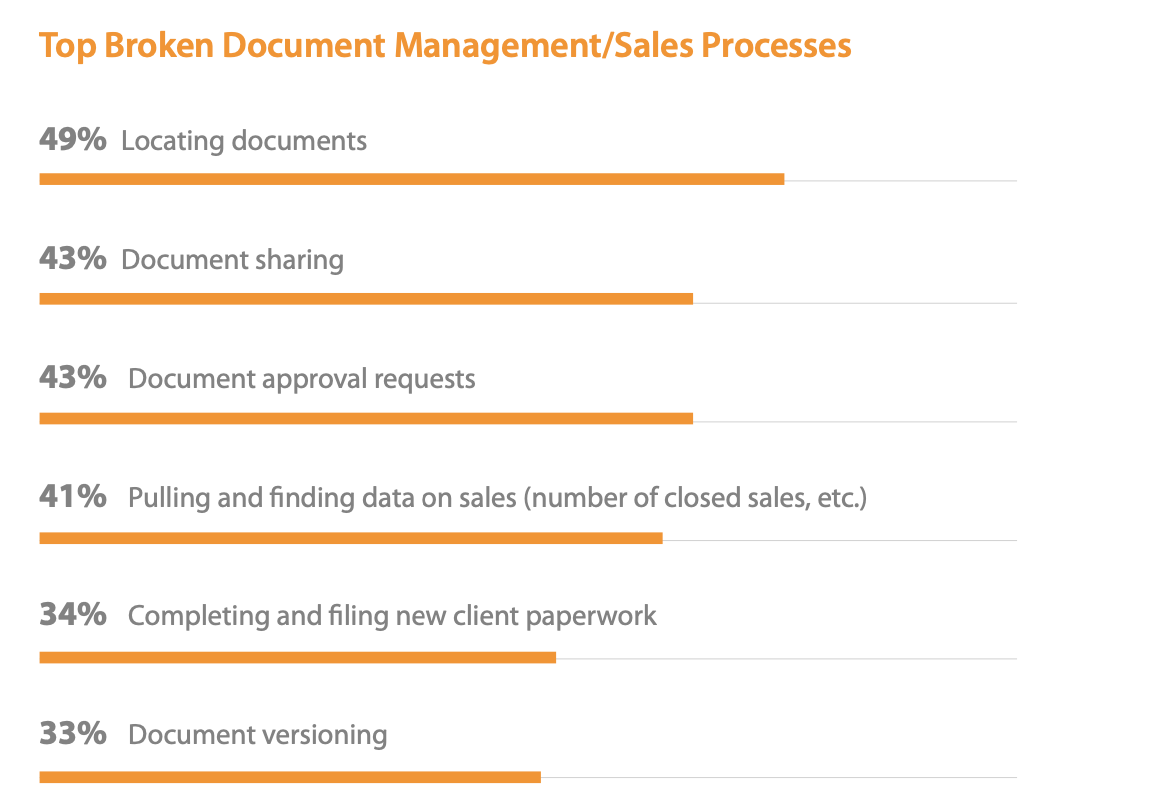
Nothing makes productivity plummet like waiting for the right information. Unfortunately, a Panopto study shows that the average employee spends 5.3 hours every week doing just that. As many as 49% of all respondents of a survey by Nintex shared that they had issues locating the right documents:
(Source)
We might not be able to eliminate the 5.3 hours entirely, but you’ll see a significant reduction with all available information in one convenient, searchable location.
2. Improve Collaboration and Communication
It’s time to leave email-based document collaboration in the 2010s and move on. The Nintex study above showed that respondents struggled with document collaboration and management issues, with 49% of respondents having trouble finding documents and 43% having issues with document sharing. With the collaboration features of an internal knowledge base, it is easier to share knowledge as team members can work together in real-time on a document, get comments, and request edits from colleagues.
3. Reduce Errors
Errors can easily creep in when it is difficult to verify if a document is the latest version — even if the file name says so.
Searching for the right version or finding out that a colleague gave feedback on an old file won’t be necessary when you have an internal knowledge base with versioning features. Versioning allows you to easily manage your documentation, allowing you to easily access the most updated version of a document as well as revert to older versions while being able to see the differences between the two.
4. Improve Your Customer Service
The clock is ticking — a HubSpot study shows that as many as 90% of customers want an immediate response when they turn to you with a support issue.

(Source)
By using internal knowledge base software to gather common support documentation and FAQs, you can make it easier for your customer service team to provide prompt service, as they won’t have to sift through tons of information to find the right answer.
5. Increase Information Security
When you gather your knowledge in one secure cloud-based environment, you don’t just protect yourself against lost USB memory sticks and stolen laptops. You also get greater control over who sees what files, all thanks to access management features.
Decide for yourself — is a document only available to the marketing team? Can it be viewed by a few select individuals or edited by anyone in the company? Access management also makes it easy to revoke access when necessary.
6. Improve Onboarding and Training
A Nintex study shows that 58% of overall respondents considered the onboarding processes broken. Access to tools and documents for good job performance, process-based onboarding, and related paperwork turned out to be the main culprits:

(Source)
A failed onboarding period can have your new hire looking for another job, resulting in additional recruitment and training costs. Nintex identified a mass of paper as one of the culprits and recommended digital onboarding materials instead. And yes, your internal KB is perfect for storing these documents.
But, it is not just your onboarding processes that can be improved by gathering all the relevant training documents in one place, but regular company training, as well.
7. Improve Work Flexibility
Often, the old ways of working trap information in content silos, such as hard drives. By storing files in a central, cloud-based location, you and your colleagues can access the files from anywhere. The accessibility lowers the negative impact of a sudden sick day, canceled flight, or stormy weather.
Are you working from home because of the COVID-19 pandemic? At least accessing the right sales report won’t be one of your worries.
8. Prevent Knowledge Loss
Does your organization have a way of retaining tacit knowledge? If not, your organization is at risk every time an employee leaves the company, as you have to spend time, energy, and resources to regain the lost know-how.
 (Source)
The average U.S. enterprise-sized company loses an estimated $42.5M per year due to insufficient knowledge sharing, with knowledge loss playing a big part. By improving your organization's ability to transfer knowledge and turn it from tacit knowledge to explicit knowledge, you lower the cost of recouping lost information.
9. Facilitate Organizational Learning
We’ve already discussed how a knowledge base can improve training processes. However, a lot of informal or social learning happens outside of formal training. Organizational learning relies on the creation, retention, and transfer of knowledge.
Having processes in place that enable all three helps you create an organizational culture of learning, reducing turnover, increasing profitability, and increasing satisfaction among employees and customers.
How to Create an Internal Knowledge Base
Building an effective internal knowledge base requires more than uploading random files into folders.
To create a system employees actually use, you need a clear strategy, proper structure, and ongoing maintenance processes.
Here’s a step-by-step guide to creating an internal knowledge base that scales with your organization.
1. Define Your Knowledge Management Goals
Start by identifying why you are building the internal knowledge base in the first place.
Ask questions like:
- What problems are we trying to solve?
- Which teams will use the knowledge base most?
- What information is currently difficult to find?
- Where are communication bottlenecks happening?
- What processes need documentation?
Your answers will shape the structure, workflows, and priorities of the knowledge base.
For example:
- A support-focused knowledge base may prioritize troubleshooting documentation
- A remote company may focus heavily on onboarding and process documentation
- A fast-growing startup may need scalable SOP management
Clear goals prevent your internal knowledge base from becoming disorganized over time.
2. Assign Ownership and Responsibilities
Knowledge bases fail when nobody owns them.
Define clear responsibilities early, including:
- Knowledge base administrators
- Content contributors
- Editors and reviewers
- Department owners
- Approval workflows
Many companies create a small knowledge management team responsible for maintaining structure and quality standards.
Ownership ensures documentation stays accurate and updated.
3. Choose the Right Internal Knowledge Base Software
The platform you choose directly impacts usability and adoption.
Look for features such as:
- Powerful search functionality
- Easy content editing
- Role-based permissions
- Version history
- Analytics and reporting
- Collaboration tools
- AI-powered search
- Integrations with Slack, Teams, CRM, or support tools
The best internal knowledge base software should make information easy to create, find, and maintain.
4. Create a Clear Content Structure
A poorly organized knowledge base quickly becomes unusable.
Start by creating top-level categories based on departments, workflows, or business functions.
For example:
- HR
- Sales
- Customer Support
- Marketing
- Product Documentation
- IT and Security
- SOPs
- Onboarding
Then create subcategories underneath each section.
A logical hierarchy helps employees navigate information faster even before using search.
5. Prioritize High-Impact Documentation First
Do not try to document everything at once.
Start with the content employees need most often.
Focus first on:
- Frequently asked questions
- Repetitive internal processes
- Onboarding guides
- Troubleshooting procedures
- Core SOPs
- Common customer support issues
This creates immediate value and encourages adoption.
6. Standardize Documentation Formats
Consistency improves readability and usability.
Create content guidelines that define:
- Writing tone
- Formatting standards
- Heading structure
- Screenshot usage
- Video guidelines
- Naming conventions
- Review processes
Templates are especially useful for recurring content types like SOPs, onboarding guides, or troubleshooting articles.
7. Make Content Easy to Search
Searchability is one of the most important parts of a successful internal knowledge base.
To improve discoverability:
- Use descriptive titles
- Include relevant keywords
- Add tags and categories
- Use consistent terminology
- Avoid vague naming structures
Employees should be able to find information within seconds.
8. Set Permissions and Access Controls
Not every document should be visible to every employee.
Use role-based access management to control sensitive information.
For example:
- HR documents may only be visible to HR teams
- Executive planning documents may have restricted access
- Company-wide SOPs may be public internally
Proper permission management improves both security and organization.
9. Encourage Employee Contributions
Knowledge sharing should become part of your company culture.
Encourage teams to:
- Document recurring processes
- Share expertise
- Update outdated content
- Submit suggestions
- Collaborate on workflows
The more employees contribute, the more valuable the knowledge base becomes over time.
10. Continuously Update and Improve Content
Internal knowledge bases require ongoing maintenance.
Outdated documentation quickly reduces trust in the system.
Schedule regular audits to:
- Remove outdated content
- Update workflows
- Improve unclear articles
- Add missing documentation
- Analyze search behavior
Analytics can help identify content gaps and commonly searched topics that need improvement.
Internal Knowledge Base Best Practices
Building an internal knowledge base is only the first step. To make it truly valuable, your knowledge base needs to stay organized, searchable, secure, and actively used by employees across the company.
The following best practices will help you create an internal knowledge base that improves collaboration, supports knowledge sharing, and scales as your organization grows.
1. Manage Access and Permissions Carefully
One of the biggest advantages of an internal knowledge base is the ability to control who can access sensitive information.
Not every employee should have access to every document. At the same time, restricting too much information can create unnecessary silos and reduce collaboration.
The key is finding the right balance.
For example:
- HR documentation may only be accessible to HR teams
- Financial reports may be limited to leadership
- Company-wide SOPs and onboarding materials can remain accessible to all employees
Role-based permissions help organizations protect confidential information while still encouraging transparency and collaboration where appropriate.
It’s also important to regularly review access permissions as employees change roles, departments, or leave the company.
2. Create a Clear and Scalable Knowledge Base Structure
Even the best search functionality cannot compensate for poor organization.
Employees should be able to navigate your internal knowledge base intuitively without relying entirely on search.
Start with a logical hierarchy using:
- Categories
- Subcategories
- Tags
- Department sections
- Process groupings
For example, your structure may look like this:
- HR
- Employee onboarding
- Benefits and policies
- Customer Support
- Troubleshooting
- Escalation procedures
- Marketing
- Brand guidelines
- Campaign workflows
A scalable structure becomes increasingly important as your documentation library grows over time.
3. Turn Your Knowledge Base Into a Daily Workflow Tool
Many companies treat their internal knowledge base like a storage archive instead of an active operational system.
That’s a mistake.
A successful internal knowledge base should become part of employees’ daily workflows.
Encourage teams to:
- Document recurring processes
- Collaborate directly within articles
- Share updates
- Maintain SOPs
- Link knowledge base content during internal communication
The more employees rely on the system during daily work, the more valuable and accurate it becomes.
This also helps reduce dependency on tribal knowledge and individual employees.
4. Standardize Documentation With Templates and Guidelines
Consistency makes your knowledge base easier to maintain and easier for employees to use.
Without standards, documentation quickly becomes disorganized and difficult to scan.
Create templates for recurring content, such as:
- SOPs
- Onboarding guides
- Project documentation
- Troubleshooting articles
- Meeting summaries
- Product documentation
Your documentation guidelines should also define:
- Tone of voice
- Formatting rules
- Heading structures
- Screenshot standards
- Naming conventions
- Internal linking practices
Standardization improves readability while reducing the time needed to create new content.
5. Prioritize Clarity and Simplicity
One of the biggest mistakes companies make is creating overly long, overly complicated documentation.
Employees should be able to find answers quickly.
Instead of writing massive “everything-in-one” articles, follow the principle of:
One topic, one article.
Clear and focused articles improve searchability and reduce confusion.
To improve readability:
- Use descriptive headings
- Break content into smaller sections
- Add bullet points and numbered lists
- Include screenshots or videos where helpful
- Add tables of contents for longer guides
The easier your documentation is to scan, the more employees will actually use it.
6. Encourage Employee Contributions and Engagement
An internal knowledge base should not depend entirely on one team or administrator.
The best knowledge bases are collaborative.
Encourage employees to contribute by:
- Sharing expertise
- Updating outdated articles
- Suggesting improvements
- Creating process documentation
- Leaving comments and feedback
You can also improve engagement through interactive features such as:
- Article ratings
- Comments
- Feedback forms
- Polls
- Contribution recognition systems
Creating a culture of knowledge sharing helps your knowledge base grow organically over time.
7. Monitor Knowledge Base Performance and Usage
Your internal knowledge base should continuously evolve based on employee behavior and feedback.
Analytics help identify:
- Most viewed articles
- Failed searches
- Content gaps
- Popular keywords
- Low-performing documentation
- Active contributors
For example, if employees repeatedly search for terms that produce no results, that signals missing documentation opportunities.
Similarly, highly viewed articles may indicate areas where teams need additional training or process clarification.
Regularly reviewing knowledge base analytics helps ensure your content stays relevant, useful, and aligned with employee needs.
Features to Look For in an Internal Knowledge Base
Most knowledge base software offers plenty of features. Some of the more important ones you’ll want to consider include:
- User-friendly dashboard. Is the design clean and intuitive for users?
- Document upload. Do you need a bulk upload or to be able to scan documents straight into the knowledge base?
- Content authoring. Does it offer useful collaboration and communication features, such as commenting, polling, real-time editing, and versioning?
- Access management. Who can access what? Can you decide who can view or edit the content on an individual, group, and public level?
- Search functionality. Does the knowledge base have a useful search function? Can you search for content within images?
- Integrations. What other apps or tools do you need integration with for an easy workflow?
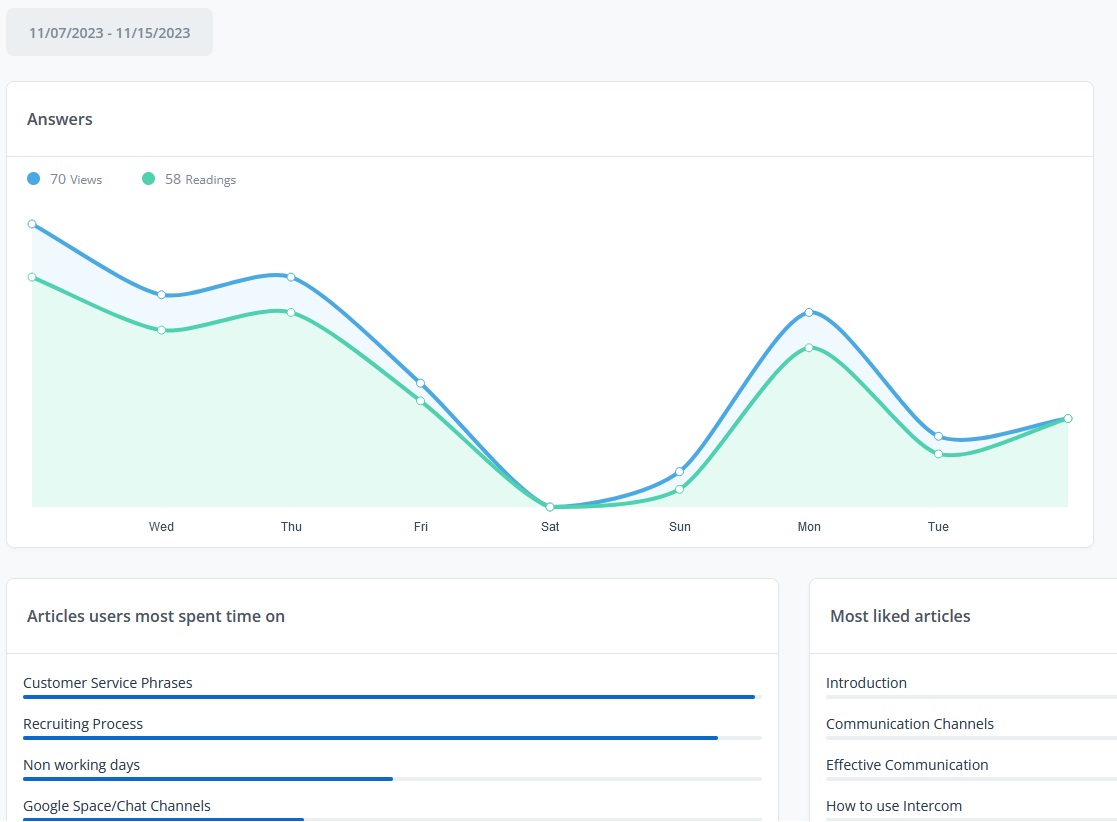
- Analytics. Will you be able to measure how employees are using the knowledge base?
- Language support. Do you need to be able to provide content in multiple languages?
- Security features. What kind of security features do you need, such as two-factor authentication or SSL?
FAQs About Internal Knowledge Bases
+ What is the purpose of an internal knowledge base?
The purpose of an internal knowledge base is to centralize company information so employees can quickly access documentation, processes, training materials, and internal resources from one place.
+ How do you structure an internal knowledge base?
Most companies structure internal knowledge bases using categories and subcategories based on departments, workflows, or business functions. Clear navigation and strong search functionality are essential.
+ What is the best software for creating an internal knowledge base?
The best internal knowledge base software depends on your business needs, but important features include powerful search, version control, collaboration tools, analytics, integrations, and role-based permissions.
+ Why is an internal knowledge base important?
An internal knowledge base improves productivity, reduces repetitive questions, prevents knowledge loss, supports onboarding, and helps teams collaborate more efficiently.
+ How do you maintain an internal knowledge base?
Regular audits, content reviews, employee contributions, analytics tracking, and clear ownership help keep an internal knowledge base accurate and useful over time.
![Internal Wiki Guide: How to Create One + Best Software to Use [2023]](https://s3.amazonaws.com/helpjuice-static/helpjuice_production%2Fuploads%2Fupload%2Fimage%2F4752%2Fdirect%2F1609788064037-Internal+Wiki.jpg)




.png)
