Process mapping is the practice of visually documenting a workflow by outlining each step, decision point, and sequence involved in completing a task. It helps organizations understand how processes work, identify inefficiencies, and improve overall performance.
Organizations use process mapping to create clarity across teams, standardize workflows, and reduce operational errors. By visualizing how work gets done, teams can quickly identify bottlenecks, eliminate unnecessary steps, and improve efficiency.
Without process mapping, workflows often rely on assumptions instead of structured processes, leading to inconsistency, delays, and miscommunication.
In this guide, you will learn:
- What process mapping is
- When to use it
- Types of process maps
- Step-by-step instructions to create one
- Best practices to improve workflows
What is Process Mapping?
Process mapping involves creating a visual or graphical representation of a business process or workflow.
Once complete, a process map will illustrate the following:
- The steps of a business process
- The sequence in which these steps take place
- Milestones, decision points, and other key markers throughout the process
What Is Process Mapping?
Process mapping is a method of creating a visual representation of a workflow to show how tasks, decisions, and actions are connected from start to finish.
A process map typically includes:
- All steps in a process
- The order in which they occur
- Decision points and alternative paths
- People, tools, or resources involved
The goal of process mapping is to make workflows easier to understand, analyze, and improve.
Instead of relying on written instructions alone, process maps provide a clear visual structure that helps teams quickly see how work flows across different stages and departments.
Process Mapping vs Knowledge Mapping
Process mapping focuses on workflows, while knowledge mapping focuses on information.
- Process mapping shows how tasks are performed
- Knowledge mapping shows what information is needed to perform those tasks
Both are complementary.
Process mapping helps identify inefficiencies in workflows, while knowledge mapping ensures employees have access to the information required to complete each step effectively.
Using both together allows organizations to improve both execution and knowledge access.
When is Process Mapping Used?
While we just explained the overarching purpose of creating a process map, let’s look at specific examples of when and how they can be useful to an organization.
Process Improvement and Optimization
Process mapping can be used in all areas of operation to improve and optimize a given workflow with the ultimate goal of improving business performance.
With a visual representation of the process in hand, teams will be better able to identify the best course of action to take at any given moment — and to identify what is needed at these moments to make it happen.
Visualizing a process as a continuum will also provide more context to stakeholders, in turn allowing them to identify optimal (and realistic) outcomes in certain situations. This will help ensure teams have the proper resources on-hand as required throughout the process.
Finally, teams of all kinds can use process mapping to identify superfluous or redundant steps within a workflow. This will allow them to eliminate redundancies and minimize waste — and instead put their resources to better use.
Business Process Reengineering
Process mapping can also be used for business process reengineering, whereby a business process needs to be redesigned from scratch.
Here, a team would want to map out the old process first to identify major and minor changes to be made. From there, the new process can be mapped out using a blank slate — while also referring back to the original process map as necessary.
Project Management
Because it provides a clear overview of specific workflows, process mapping is invaluable to project management.
On the surface, it allows team leads and their employees to understand all involved in the process. All stakeholders will then better understand their assignments, task dependencies, and all in-between.
A process map will also make potential bottlenecks more obvious — allowing teams to deal with them proactively and before they cause too much trouble.
Software Development
Process mapping can be very useful for software development and software documentation, as it helps developers visualize and document the steps involved in a software development process.
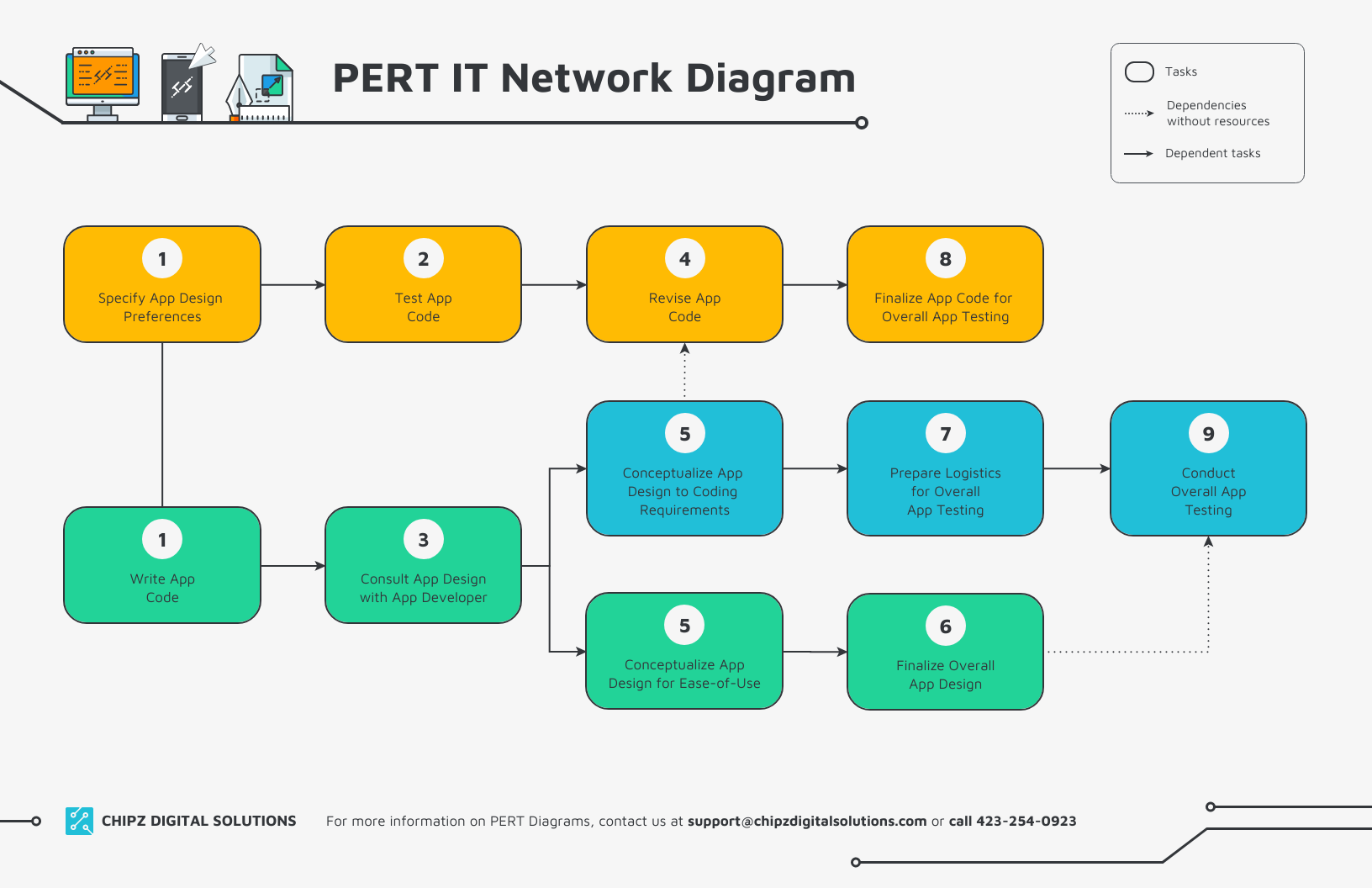
This is essentially an extension of project management: With a process map in place, dev teams will have a comprehensive overview of everything involved in an upcoming project.
This will enable them to effectively:
- Gather requirements
- Design the product
- Develop the necessary code
- Test the software
- Deploy the new product
According to the latest software development trends, AI-driven automation (47% of AI deployments target IT processes) and low-code adoption (expected to power 75% of new apps by 2026) are reshaping how teams work. Process maps help integrate these innovations, streamline handoffs, and maintain clarity in increasingly automated workflows.
Compliance and Regulatory Requirements
Process mapping can help organizations maintain regulatory compliance in two key ways.
- For one, laying out all aspects of a given process ensures teams are covering all their bases, seeing every angle, and not overlooking anything important. If there’s an area where they aren’t compliant — or are even at risk of not being so — process mapping will help them identify and fix it as quickly as possible.
- Secondly, mapping out certain processes may actually be a part of maintaining compliance in some cases. For example, an organization operating in the medical industry may be required to show how, specifically, they keep customer data private — and a process map will likely be a part of this documentation.
Key Benefits of Process Mapping
As intensive of a process as process mapping can be, it will almost always lead to a number of benefits for your organization and stakeholders.
Such as…
1. Create Clarity of Process and Purpose
As we’ve said, process mapping provides a comprehensive overview of a given workflow in as much detail as is necessary.
For your team, this ensures that all involved parties know who’s responsible for what, when they’re responsible for diving in, and what they’ll need when it’s their time to act.
For your customers, process mapping can help you communicate:
- How you operate in a certain area
- What’s involved in your processes
- Why you do things a certain way (or why you’re changing things up)
All this keeps your audience aligned with your company goals and ensures that you’re operating ethically and above-board at all times.
Finally, creating comprehensive process maps helps show your investors (and/or potential buyers) that your business is sound, productive, and valuable. Similarly, when making fundamental changes to your operations, you can communicate the rationale and value behind these changes to those investing in your business.
2. Improve Decision-Making
With increased clarity and a comprehensive view of your processes, your team will be in a prime position to make effective decisions on both a macro and micro level.
As we’ve touched on, this might involve:
- Rearranging processes to streamline operations
- Reallocating resources more appropriately
- Deciding to revamp a business process altogether
You’ll also be better able to see and understand the implications of making changes to a given process — and the impact it can have on other areas of your operations. This, in turn, will keep you from making sweeping changes that could end up causing more harm than good.
3. Improve Effectiveness and Efficiency
With the above in mind, it’s pretty clear that mapping your various processes will improve your team’s overall effectiveness — and make you more efficient.
It’s pretty simple:
Better business decisions + a better use of resources = Increased productivity across the board
Moreover, you’ll be better able to make the necessary changes productively. With a clear plan of attack in front of you, your team will know exactly what they need to do to improve their workflows. This means less trial-and-error and guesswork — and more intentional effort put into making the changes ahead.
4. Reduce Operational Costs
Mapping out your various processes can potentially lead to a drastic reduction in operational costs.
(In fact, Tesco recently announced an anticipated 7% decrease in operating costs due to a newfound focus on process mapping and improvement.)
This all stems from much of what we’ve discussed thus far, such as:
- Streamlining processes
- Optimizing resource usage
- Minimizing redundancies, bottlenecks, and superfluous tasks
5. Minimize Operational Risks
Similarly, process mapping can help minimize risk at all stages of operations.
Depending on the circumstances, a proper process map will help you minimize variables, eliminate unnecessary steps, and/or keep expenditures as low as possible. You’ll also be better able to anticipate major “trouble spots” within your processes — and to put safeguards in place to protect your operations at these moments.
For organizations where compliance is an issue, the ability to stay above-board at all times minimizes the risk of facing major penalties and sanctions that could do massive damage to the business.
6. Enhance Knowledge Retention and Transfer
According to a recent report from Sinequa, over 60% of companies say they’ve experienced the loss of knowledge due to employees leaving abruptly — with 67% saying it’s causing a significant problem for their business.
While there are many ways to retain and transfer organizational knowledge, process mapping is certainly one of them.
With a documented process map in place, you’ll know exactly what an individual employee is responsible for at any given time throughout a project. In many cases, your process maps will provide a detailed look at their individual tasks and the explicit and tacit skills needed for them to complete said tasks.
That way, even if an individual employee resigns from their position, you’ll be able to quickly fill the gaps without reinventing the wheel — either with your current staff members or by bringing in a new hire.
7. Facilitate Change Management
When being used to optimize processes, process mapping will also aid in facilitating change management throughout your team.
As mentioned earlier, a well laid-out process map will clarify what changes are being made and why the “new way” is an improvement over the old. When your team members can see how the changes will make them more productive (and likely make their job easier), they’ll almost certainly be more receptive to the change in the first place.
And, practically speaking, you’ll again have all the necessary information to implement specific changes to your workflows.
Common Types of Process Maps
Different types of process maps are used depending on the level of detail, complexity, and purpose of the workflow. The most common types of process maps include:
- Flowcharts
- Swimlane Diagram (Cross-Functional Flowchart)
- SIPOC Diagrams
- Value Stream Maps
1. Flowchart
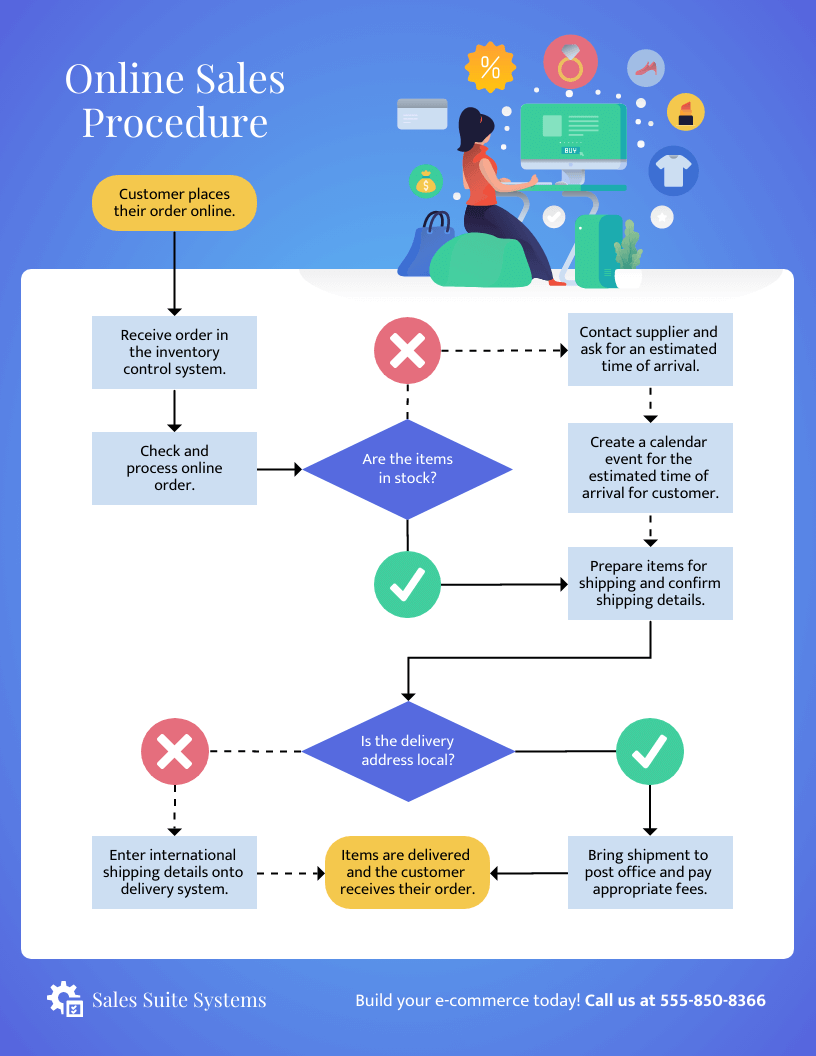
A flowchart is the simplest type of process map that shows the sequence of steps in a process from start to finish.
(Source)
It is best used for:
- Documenting basic workflows
- Explaining processes step by step
- Identifying simple decision points
Flowcharts use standard symbols to represent actions, decisions, and flow direction, making them easy to understand for any team.
Use a flowchart when you need a clear and straightforward overview of a process.

(Source)
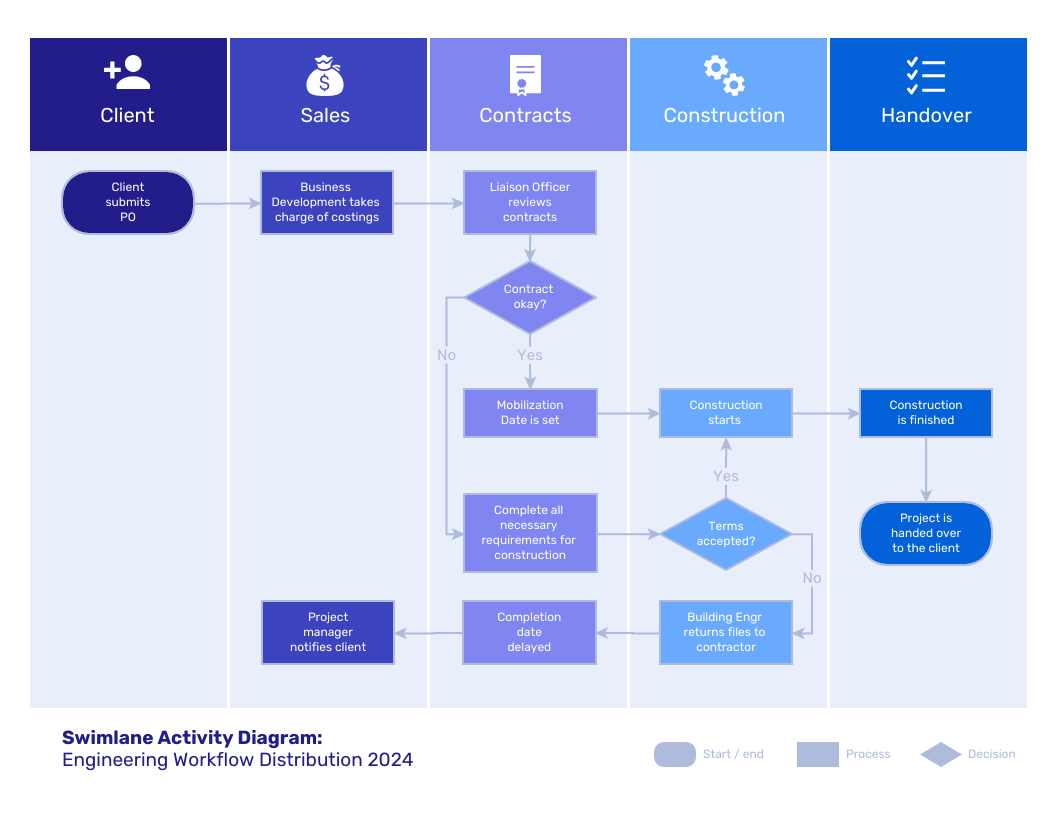
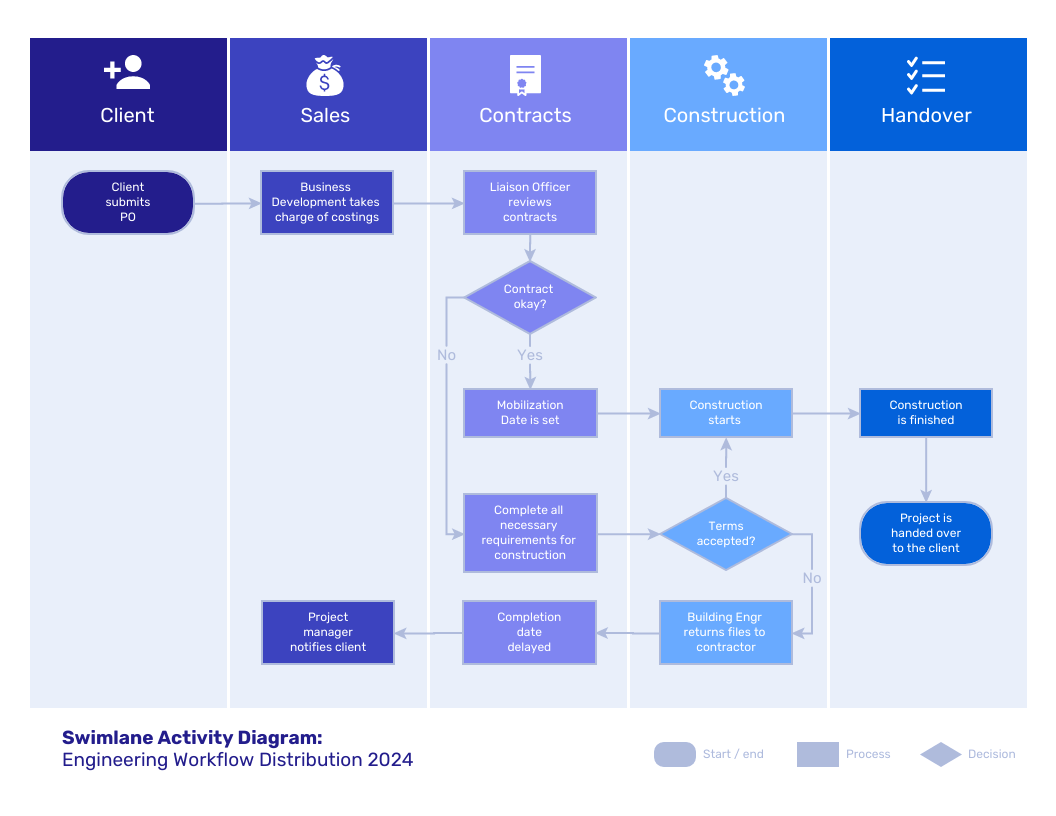
2. Swimlane / Cross-Functional Flowchart
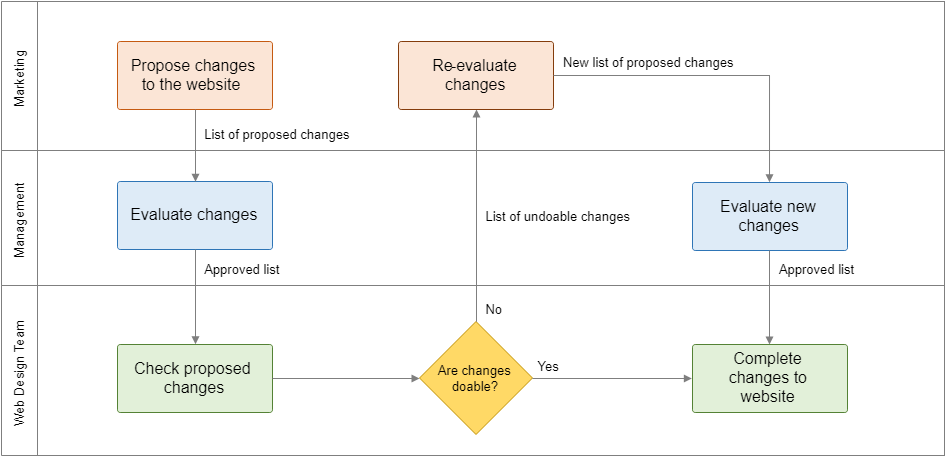
A swimlane diagram shows both the process steps and the roles or departments responsible for each step.

(Source)
It is best used for:
- Cross-team workflows
- Processes involving multiple stakeholders
- Identifying handoffs and responsibilities
Each “lane” represents a team or role, making it easy to see who is responsible at each stage.
Use swimlane diagrams when you need to improve accountability and collaboration.
In some cases, such as the example below, action steps are listed between processes to explain what must happen before the process is handed off.
(Source)
3. SIPOC Diagram
A SIPOC diagram provides a high-level overview of a process by mapping Suppliers, Inputs, Process, Outputs, and Customers.

(Source)
As shown above, a SIPOC diagram provides a high-level overview of who and what is involved in a process from start to finish.
It is best used for:
- Understanding process scope
- Defining inputs and outputs
- Analyzing process dependencies
Unlike flowcharts, SIPOC diagrams do not focus on step-by-step flow. Instead, they show how different elements connect within a process.
Use SIPOC when you need a strategic overview of a process.
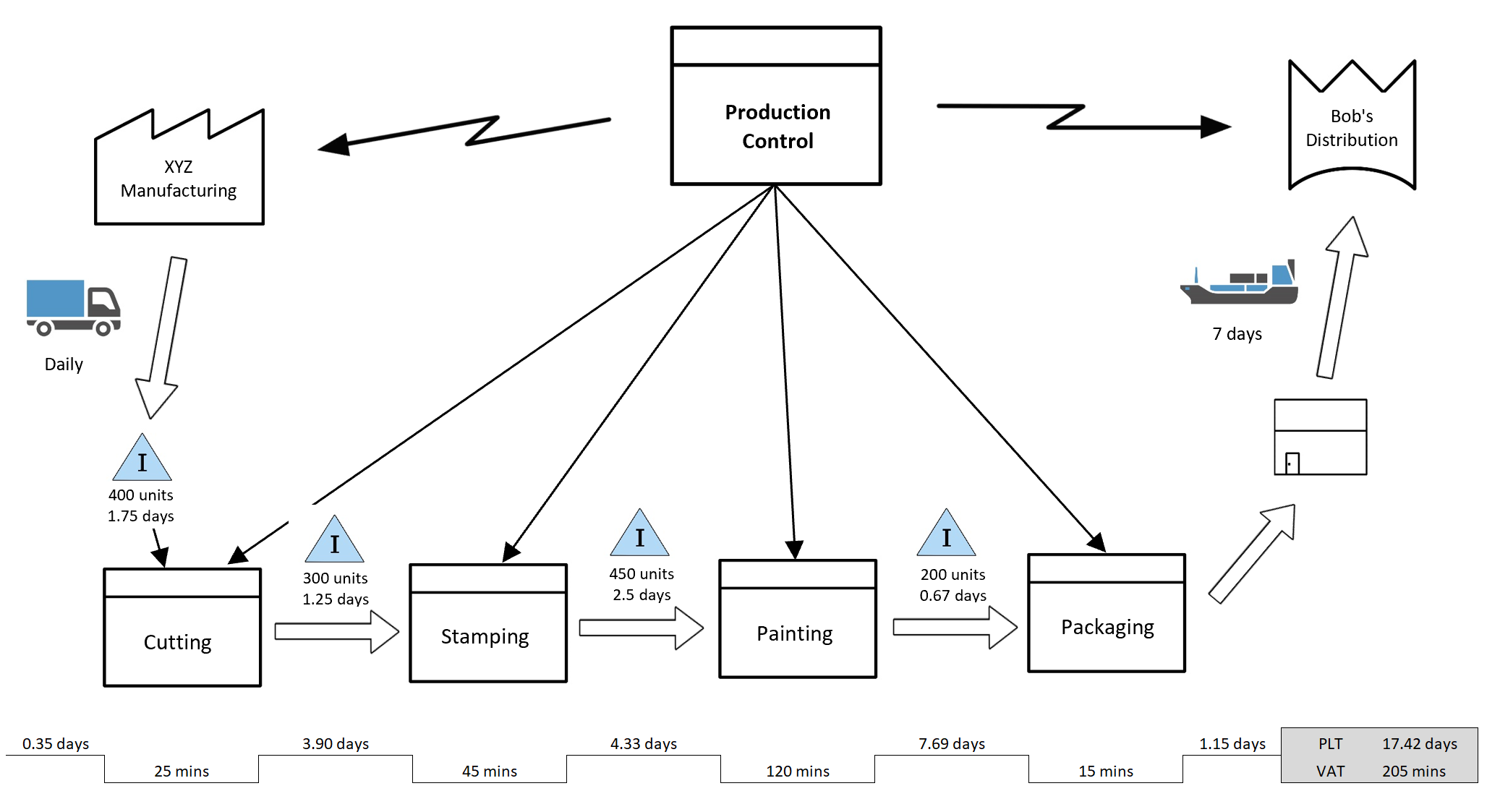
4. Value Stream Map
A value stream map visualizes the flow of materials and information across a process, including time, resources, and efficiency metrics.

(Source)
It is best used for:
- Identifying bottlenecks and waste
- Improving efficiency and performance
- Lean and Six Sigma initiatives
These maps often include detailed data such as:
- Cycle time
- Lead time
- Resource usage
Use value stream maps when your goal is process optimization and efficiency improvement.
Process Map Symbols
As you’ve likely seen even in passing, process maps typically include a number of different symbols, shapes, and lines within them.
In fact, a number of systems have been developed over the years in order to create more uniformity when designing process maps of various kinds.
For example, the International Organization for Standardization officially uses ANSI symbology within their process maps.

(Source)
Business Process Modeling Notation offers another system for process map notation:
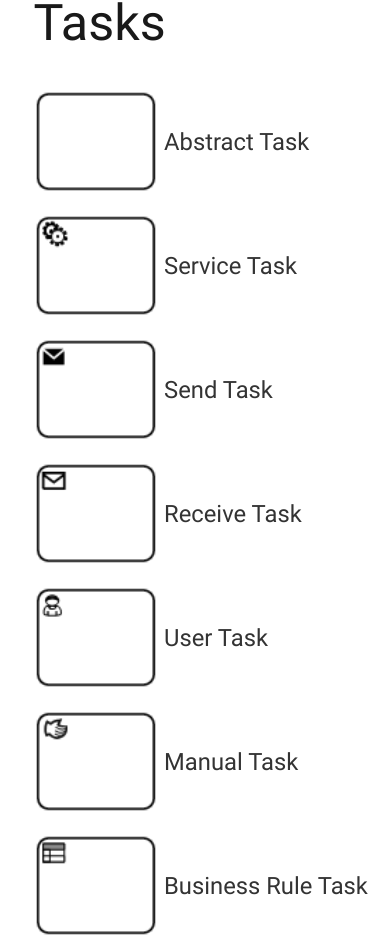
(Source)
As the name suggests, the BPMN system is used to map out and improve business processes of all kinds. As such, it’s a versatile system that can be implemented by multiple departments for a variety of purposes.
Finally, there’s the Universal Modeling Language system for process map symbols:

(Source)
In contrast to BPMN, UML is specifically used in the software and tech development field. As such, it’s more object- and product-centric than its process-centric counterparts.
How to Create a Process Map (Step-by-Step)
Creating a process map involves defining a workflow, documenting each step, and visualizing it in a clear structure. Follow these steps to build an accurate and effective process map that improves efficiency and decision-making.
Step 1: Define the Process You Want to Map
Start by identifying the specific process you want to visualize.
Focus on processes that:
- Impact business performance
- Have frequent issues or bottlenecks
- Involve multiple teams or dependencies
Clearly define:
- Where the process starts
- Where it ends
- What outcome it should achieve
A well-defined process ensures your map stays focused and useful.
Step 2: Gather All Tasks, Actions, and Resources
List every step involved in the process from start to finish.
Include:
- Tasks and sub-tasks
- Decision points
- People involved
- Tools, systems, or resources required
The goal is completeness. Missing even small steps can lead to inaccurate process maps and poor decisions later.
Step 3: Define Scope and Level of Detail
Determine how detailed your process map needs to be.
Ask:
- Is this map for documentation or improvement?
- Who will use it?
- How complex is the process?
For example:
- High-level overview → simple flowchart
- Process optimization → detailed mapping
Setting the right scope prevents overcomplicating or oversimplifying your map.
Step 4: Arrange Steps in Sequential Order
Organize all tasks in the exact order they occur.
Make sure to:
- Show the flow from start to finish
- Include decision points (yes/no paths)
- Capture dependencies between steps
This step transforms raw information into a structured workflow.
Step 5: Choose the Right Type of Process Map
Select a format based on your goal.
Common options:
- Flowchart → simple processes
- Swimlane diagram → role-based workflows
- SIPOC diagram → high-level overview
- Value stream map → detailed efficiency analysis
Choosing the right type makes your process easier to understand and use.
Step 6: Create the Process Map
Now convert your structured steps into a visual diagram.
Use:
- Standard symbols (flowchart, BPMN, or internal system)
- Clear labels for each step
- Logical flow from start to end
Keep the design:
- Clean
- Readable
- Easy to follow at a glance
The goal is clarity, not complexity.
Step 7: Review and Validate the Process Map
Share the process map with stakeholders to verify accuracy.
Check for:
- Missing steps
- Incorrect sequences
- Confusing transitions
- Gaps in responsibilities
Also, test if someone unfamiliar with the process can understand it. If they cannot, simplify it.
Step 8: Publish and Continuously Improve
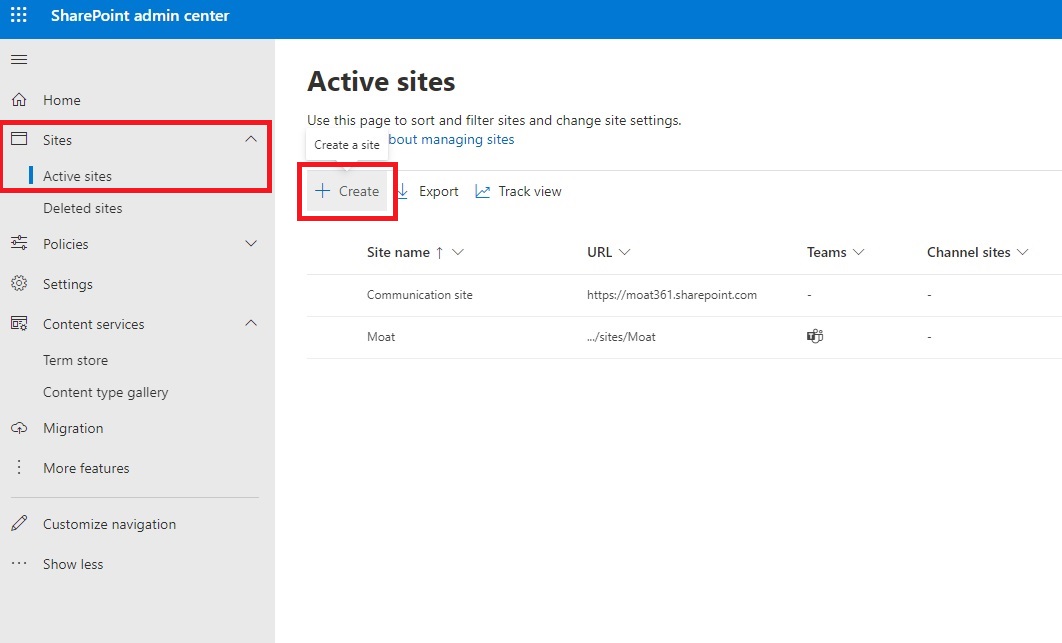
Once validated, publish the process map in a central location like your knowledge base.
After publishing:
- Collect feedback from users
- Monitor performance and bottlenecks
- Update the map as processes evolve
Process maps should be treated as living documents, not static files.
Best Practices for Process Mapping
Process mapping works best when it is simple, consistent, and aligned with real workflows. Following structured best practices ensures your process maps are clear, usable, and actually improve efficiency rather than adding complexity.
1. Involve All Relevant Stakeholders
Process maps should reflect how work actually happens, not how it is assumed to happen.
Involve employees, managers, and stakeholders who are directly part of the workflow. This helps ensure accuracy and uncovers gaps that may not be visible from a single perspective.
Stakeholders can help you:
- Identify missing steps or dependencies
- Highlight decision points and exceptions
- Point out inefficiencies or redundant tasks
This step improves both accuracy and adoption of the process map.
2. Keep the Process Map Simple and Focused
A process map should be easy to understand at a glance.
Avoid adding unnecessary detail that makes the workflow harder to follow. Focus on the level of detail required for your goal.
Use this rule:
- High-level goal → simple map (flowchart)
- Optimization goal → detailed map (value stream or SIPOC)
If a step is obvious or universally understood, it does not need to be over-explained.
Clarity always matters more than complexity.
3. Use Consistent Symbols and Notation
Consistency is critical for usability.
Choose a system such as:
- Flowchart symbols
- BPMN (Business Process Modeling Notation)
- Internal standardized symbols
Then apply it consistently across all process maps.
This ensures:
- Faster understanding across teams
- Easier onboarding for new employees
- Scalable documentation across departments
Even a simple internal system works as long as it is consistent.
4. Standardize Your Process Mapping Workflow
Creating process maps should follow a repeatable structure.
Define a standard workflow for:
- Identifying processes
- Documenting steps
- Reviewing maps
- Publishing and updating
This is where SOPs play a key role.
Standardization ensures:
- Consistency across teams
- Faster documentation
- Easier updates over time
5. Focus on Real Workflow Data, Not Assumptions
Process maps should reflect real operations, not theoretical workflows.
Use:
- Team input
- Performance data
- Observations from actual processes
This helps identify:
- Bottlenecks
- Delays
- Inefficiencies
Accurate data leads to actionable improvements.
6. Use Your Knowledge Base as a Central Source of Truth
A knowledge base makes process mapping scalable and accessible.
It helps you:
- Identify which processes need mapping
- Store and organize process documentation
- Link process maps with detailed instructions
- Keep everything updated in one place
Publishing process maps in a centralized system ensures employees always access the latest version.
7. Continuously Review and Improve Process Maps
Process mapping is not a one-time activity.
Regularly review your maps to:
- Update outdated steps
- Improve workflows based on feedback
- Adapt to new tools or processes
Treat process maps as living documents that evolve with your organization.
Frequently Asked Questions (FAQs)
+ Why is process mapping important?
Process mapping improves clarity, efficiency, and consistency across workflows. It helps identify bottlenecks, reduce errors, and ensure tasks are completed in the correct sequence.
+ What is the difference between process mapping and flowcharting?
Process mapping is a broader concept that includes various ways to visualize workflows. Flowcharting is one specific method used to show step-by-step processes.
+ When should you use process mapping?
Process mapping should be used when:
- Improving workflows
- Identifying inefficiencies
- Training employees
- Standardizing processes
- Managing complex projects
It is especially useful when processes involve multiple teams or steps.
+ What tools are used for process mapping?
Common tools include:
- Diagramming software (Lucidchart, Visio)
- Knowledge base platforms
- Workflow management tools
Many organizations also use internal knowledge bases to store and manage process maps.
+ What is an example of process mapping?
A common example is documenting a customer support workflow, including steps like receiving a ticket, assigning it to an agent, resolving the issue, and closing the request.
+ How detailed should a process map be?
The level of detail depends on the purpose:
- High-level overview → simple map
- Process improvement → detailed map
A process map should include enough detail to be useful without becoming overly complex.
+ What are common mistakes in process mapping?
Common mistakes include:
- Overcomplicating the process
- Missing key steps or dependencies
- Not involving stakeholders
- Using inconsistent symbols
- Failing to update maps over time
Avoiding these ensures your process maps remain accurate and effective.






.png)