

- An employee evaluation form is a document that measures employee performance over a set period, such as 3–12 months. Managers use it to rate skills, track goals, and provide feedback on productivity, behavior, and achievements.
- The main parts of an employee evaluation form include the personal information of the employee, performance ratings, goal review, strengths and achievements, areas to improve, and employee self-assessment.
- You can create an employee evaluation form by following a series of steps, including planning the evaluation form, defining the rating scale, creating the different sections one by one, choosing the right format and tool for distribution, and testing it before rolling it out.
Download Employee Evaluation Forms Templates
Here is a list of all the form templates mentioned in this post, along with their download links.
1. General Employee Performance Evaluation Template → Download DOCX | Download PDF
2. Essay Employee Review Template → Download DOCX | Download PDF
3. Numerical Scale Form → Download DOCX | Download PDF
4. Peer Review Form → Download DOCX | Download PDF
5. Group Evaluation Form → Download Excel | Download PDF
6. Employee Self-Evaluation Form → Download DOCX | Download PDF
7. Introductory Period Performance Review Template → Download DOCX | Download PDF
8. 30-60-90 Review Template → Download DOCX | Download PDF
Introduction
Employee evaluation forms are an analytical instrument used by businesses and organizations to keep an eye on the performance and productivity of their employees. In this post, we’re going to guide you on these forms in more detail, tell you about their benefits, what parts an employee evaluation form is made up of, and also how you can create one for your business.
Let’s get started.
What is an Employee Evaluation Form?
An Employee Evaluation Form measures employee performance against defined job criteria. Managers use it to assess skills, productivity, and behavior during review periods such as quarterly or annually. The form records strengths and identifies areas of improvement.
Small teams use simple forms with 5–10 criteria, while large organizations use detailed forms with ratings, weighted scores, and KPIs.
What are the Benefits of Using Employee Evaluation Forms?
Here are some of the benefits of using an employee evaluation form.
Structured feedback gives managers a consistent framework to evaluate every employee the same way, removing guesswork and bias.
Clear performance tracking makes it easier to spot growth, stagnation, or decline over time with documented records.
Goal alignment helps employees understand what's expected of them and how their work ties into broader company goals.
Accountability creates a paper trail that holds both employees and managers responsible for commitments made during reviews.
Identifying training needs highlights skill gaps early so the right development resources can be allocated before problems grow.
Fair compensation decisions give HR and management data-backed reasoning for raises, promotions, or performance-based decisions.
Improved communication opens a formal channel for two-way feedback that might not happen in day-to-day work.
Legal protection means documented evaluations can protect a company in disputes or termination cases by showing a history of performance issues.
Employee engagement gets a real boost when evaluations make employees feel seen and give them a roadmap for growth.
Standardizing the review process ensures no department or manager is running reviews completely differently from the rest of the organization.
What are the Parts of an Employee Evaluation Form?
Here are some of the typical parts of an employee evaluation form.
1. Personal Information
This section covers the basic identifying details of the employee being reviewed.
2. Performance Ratings
This is the core of the form. Managers score employees across key competencies, usually on a numerical or descriptive scale.
3. Goal Review
A look back at the objectives set during the last evaluation period. This section measures actual outcomes rather than impressions, so the review stays grounded in what was agreed upon.
4. New Goals
Sets the targets for the next review cycle. Goals should be specific and agreed upon by both sides so the employee knows exactly what they're working toward.
5. Strengths and Achievements
Dedicated space to recognize standout contributions, specific wins, and any performance that went above expectations.
6. Areas for Improvement
Addresses gaps in performance or behavior. Done right, this section is constructive rather than punitive and ideally comes with context and a path forward.
7. Training and Development Needs
8. Employee Self-Assessment
The employee evaluates their own performance before or alongside the manager's review. This section often surfaces perspectives and blind spots that a one-sided review would miss.
9. Manager Comments
An open-ended section for additional context, observations, or anything the rating scales don't fully capture. This part usually doesn’t have a fixed format.
10. Signatures and Acknowledgment
How to Create an Employee Evaluation Form: Complete Guide
Step 1: Define the Purpose of Your Form
The first step in creating an employee evaluation form is defining its main purpose.
This is the step most people skip, and it's the reason a lot of evaluation forms end up feeling generic and useless.
Before you open a blank document and start typing out fields, you need to know what you're actually building the form for. The purpose dictates everything: the sections you include, the competencies you rate, how detailed the form gets, and even how often it gets used.
Here are the most common reasons companies create employee evaluation forms:
A form built for a probationary review looks nothing like one built for annual performance tracking. If you try to make one form do everything, it ends up doing nothing well.
Tip: Write down the one main outcome you want from this evaluation before building anything. That single sentence will keep the rest of the form focused.
Once you're clear on the purpose, everything else falls into place a lot more naturally.
Step 2: Identify the Competencies You Want to Evaluate
After you have defined the general purpose of the evaluation form, the next thing you need to do is list the competencies that you wish to evaluate with it.
Competencies are the skills, behaviors, and outcomes you're actually going to measure. This is where the form starts taking shape.
Don't just pull a generic list off the internet and call it done. Think about what actually matters for the roles you're evaluating. A customer service rep and a software engineer might share some competencies, but most of them will look very different in practice.
Start by asking: What does good performance actually look like in this role? Then work backwards from that answer.
Some common competency categories to consider:
Job-specific technical skills
Communication and collaboration
Attendance and reliability
Goal completion and output quality
Problem-solving and initiative
Leadership and mentorship where relevant
Tip: Keep your competency list focused. Eight to twelve categories is usually the sweet spot. Go beyond that, and the form starts feeling like a chore for everyone involved.
Once you have your list, group similar competencies together so the form flows logically from one section to the next.
Step 3: Choose a Rating Scale
Once you know what you're evaluating, you need to decide how you're going to score it. Your rating scale is the backbone of the performance ratings section, and it needs to be simple, consistent, and actually meaningful.
Here are the most common options:
There's no universally correct choice here. What matters is that everyone using the form interprets the scale the same way. A 3 out of 5 should mean the same thing whether a manager in one department fills it out or a manager in another does.
Tip: Avoid scales that are too wide, like 1 to 10. They create false precision and make scoring inconsistent across managers.
Step 4: Write Clear Rating Definitions
It is important to write clear definitions for the ratings in the scale so that people using the form don’t face any sort of confusion.
A rating scale without definitions is just a row of numbers. Two managers can look at the same employee and score them completely differently if they don't have a shared understanding of what each rating actually means.
For every competency and every rating level, write a short description of what that score looks like in practice. For example:
Write these definitions before the form goes live, and make sure every manager has access to them during the review process.
Tip: Test your definitions by applying them to a real employee you already know well. If the scores feel off, adjust the language until they reflect reality accurately.
Step 5: Build Out Each Section of the Form
Now you actually put the form together. Go section by section and don't rush this part. The structure of the form is what makes the review conversation easier or harder for everyone involved.
Here's the order that works best for most evaluation forms, as mentioned previously:
Personal information fields (name, role, department, review period)
Performance ratings using the competencies and scale you defined
Goal review referencing the previous cycle's targets
New goals for the upcoming period
Strengths and achievements
Areas for improvement
Training and development needs
Employee self-assessment
Open-ended manager comments
Signature and acknowledgment section
Keep each section clearly labeled and give enough space for written responses where they're needed. A cramped form discourages thorough feedback.
Tip: If you're building this digitally, use conditional logic where possible. For example, if a manager rates a competency below a certain threshold, a prompt appears asking them to add a comment. It keeps feedback actionable.
Step 6: Decide on the Format and Tool
Once your employee evaluation form is made, you have to decide which format to save it in and the tool that you’ll be using for distribution.
The best form in the world is useless if it's difficult to fill out, share, or store. How you build and distribute your evaluation form matters just as much as what's in it.
Here are the most common options:
If you're a small business running reviews for the first time, a well-structured Google Form or Word document gets the job done. If you're managing a larger team and want to track performance trends over time, an HR platform is worth the investment.
Tip: Whatever format you choose, make sure completed forms are stored somewhere centralized and accessible. A review that gets lost after it's submitted is a review that never happened.
Step 7: Add a Self-Assessment Component
Just before finalizing the employee evaluation form, make sure that it contains a self-assessment component at the very end.
A self-assessment section asks employees to evaluate their own performance before the manager does. Send the form to the employee first, let them fill out their portion independently, and then have the manager complete their side separately. Only compare notes during the actual review conversation.
This approach does a few things. It gives employees ownership over their own growth. It surfaces blind spots that a one-sided review would miss. And it makes the conversation that follows a lot more productive because both sides come in with something to say.
Tip: Keep the self-assessment prompts open-ended. Questions like "What are you most proud of this period?" and "Where do you feel you could have done better?" get more honest responses than a mirrored rating scale.
Step 8: Test It Before Rolling It Out
Before this form touches a single real review, run it through a dry test internally.
Pick one or two managers, have them fill it out for a hypothetical or past employee, and then debrief. Ask them where they got stuck, what felt unclear, and whether anything important was missing. The goal is to catch problems before they affect real performance conversations.
Some questions to pressure-test the form with:
Do the competencies cover everything relevant to the role?
Is the rating scale clear and consistent across sections?
Are any sections redundant or confusing?
Does the form feel too long, too short, or just right?
Would a manager new to the company be able to fill this out without guidance?
Make adjustments based on what you find. One round of testing saves a lot of headaches down the line.
Step 9: Train Your Managers on How to Use It
Before rolling out the evaluation form, walk your managers through it. Cover how to apply the rating scale consistently, how to write useful comments in the open-ended sections, and how to have the actual review conversation with the employee afterward. The form is a tool. The manager is the one who makes it useful or not.
Common mistakes to address during training:
Rating everyone in the middle to avoid conflict (also known as central tendency bias)
Letting one recent event color the entire review (recency bias)
Scoring based on personal rapport rather than actual performance (affinity bias)
Leaving comment sections blank and relying only on scores
Tip: Run a mock review session with your managers before evaluations go live. It's the fastest way to surface inconsistencies in how the form is being interpreted.
Step 10: Store and Revisit Completed Forms
Completed evaluation forms are only valuable if you can actually find and use them later.
Set up a system for storing forms that is organized, consistent, and accessible to the right people. Whether that's a shared drive with clearly labeled folders, an HR platform, or a document management system, the structure matters. An evaluation buried in someone's email inbox might as well not exist.
More importantly, build in a habit of revisiting past evaluations before each new review cycle. The goals set in the last review become the baseline for the next one. Without that continuity, evaluations become isolated events instead of part of an ongoing performance conversation.
Tip: Set a calendar reminder two to three weeks before each review cycle to pull up the previous evaluations. It takes five minutes and makes the entire process significantly more informed.
What Type of Evaluations Can You Do with an EEF?
There are different types of evaluations that you can do with an employee evaluation form. The exact type of evaluation that you do changes what the form contains and the type of questions it contains.
Here is a table that covers some example evaluation types.
Best Practices and Tips to Remember When Making an Employee Evaluation Form
Above, we’ve listed the steps that you need to follow when making an employee evaluation form. In this part, however, we’re going to give you some best practices and tips that you can keep in mind for each step to make sure that it is properly executed.
When defining your purpose, be specific about the outcome. "Improve performance" is not a purpose. "Identify employees ready for a team lead role by Q4" is. The more specific your purpose, the more obvious it becomes which sections matter and which ones are just filler.
When identifying competencies, tie each one to a real behavior. Don't just write "communication." Write what good communication actually looks like in that role. "Responds to client emails within 24 hours" is something you can measure. "Good communicator" is something you can argue about forever.
When choosing a rating scale, make sure the middle score has a clear meaning. Most rating disagreements happen at the center of the scale. If a 3 out of 5 means "average" to one manager and "solid, no complaints" to another, your data is already inconsistent before the review even starts.
When writing rating definitions, test them against your worst and best performers. If your definitions don't clearly separate someone you'd promote tomorrow from someone you're managing out, rewrite them. The definitions only work if they reflect reality at both ends.
When building out sections, cut anything that won't influence a decision. Every section on the form should connect to an action: a conversation, a goal, a raise, a development plan. If a section gets filled out and then ignored, it's just paperwork.
When choosing a format, match it to how your managers actually work. A beautifully structured HR platform nobody logs into is worse than a Google Form everyone actually fills out. Adoption beats sophistication every time.
When adding a self-assessment, send it to the employee before the manager fills out their side. If both sides fill it out simultaneously or the manager goes first, the self-assessment becomes reactive. The employee should come to the table with their own perspective formed independently.
When testing the form, use a real scenario, not a hypothetical. Pick an actual past employee and walk a manager through scoring them. Hypotheticals are too easy to agree on. Real people surface the edge cases where the form breaks down.
When training managers, focus more on the conversation than the form. The form is just the prep work. What matters is what happens in the room. Train managers on how to deliver feedback, handle pushback, and turn scores into a productive discussion.
When storing completed forms, attach the next cycle's goals to the same file. When the next review comes around, the manager should open one document and see everything: last period's scores, what was said, and what was agreed on. Continuity is what makes evaluations compound over time.
Employee Evaluation Forms Templates
If you’re not sure how to get started with making an employee evaluation form, here are some templates that you can use. These templates are all provided with their Word and PDF format download links.
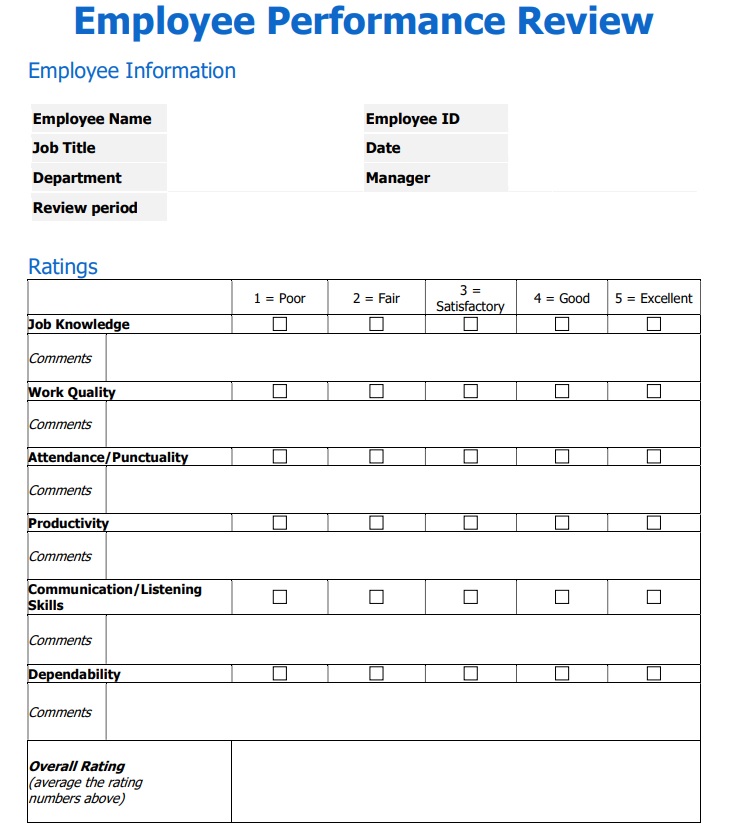
1. General Employee Performance Evaluation Template
This is a formal review of an employee’s overall performance which can be conducted monthly, quarterly, or annually. It has questions answerable by yes or no with a general comment section at the end.
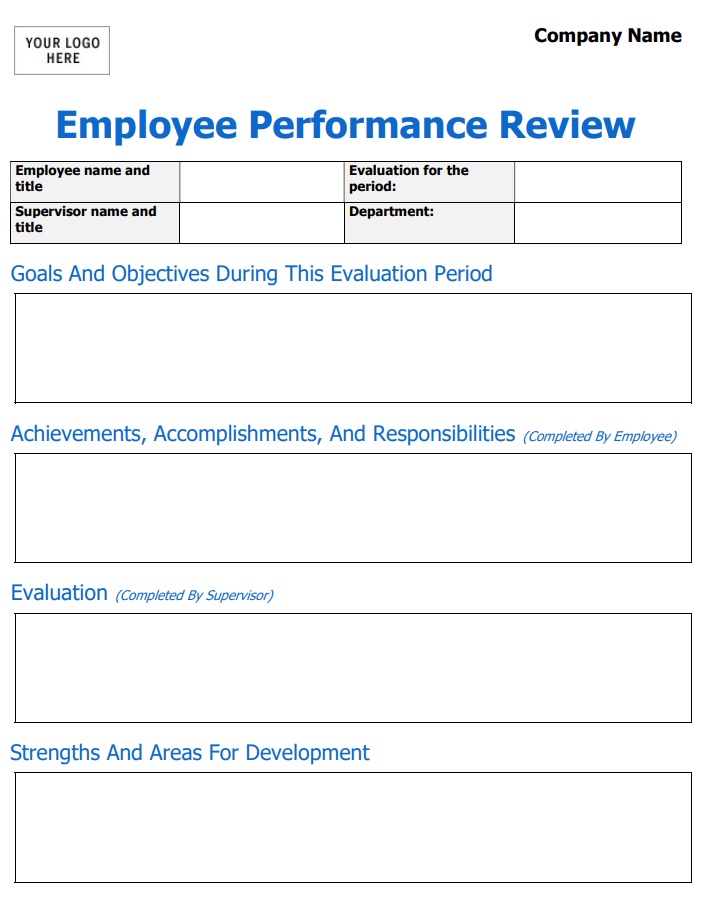
2. Essay Employee Review Template
This performance review template follows the narrative format. However, the potential downside is that the essay can be biased and contain personal grudges or incidents not directly related to performance.
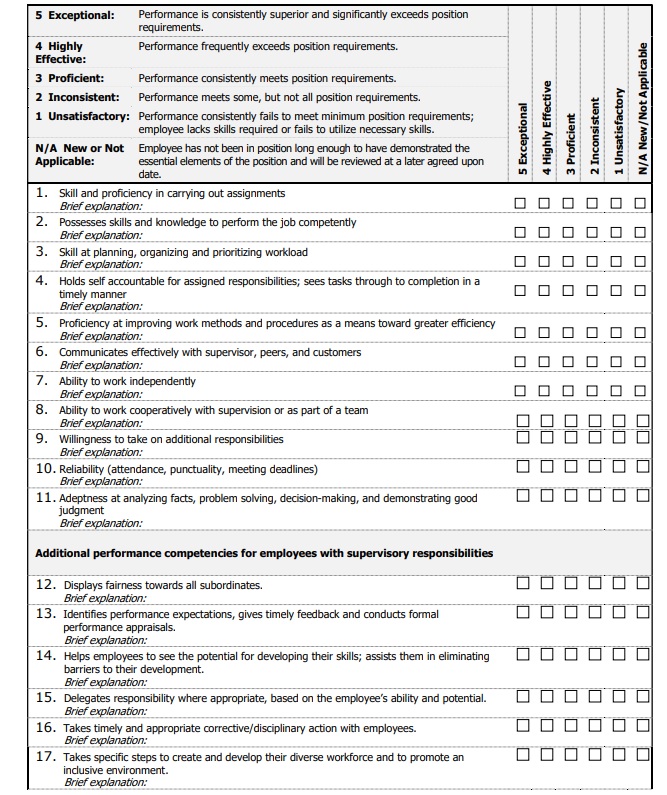
3. Numerical Scale Form
This employee performance review template uses an ordered set of numbers where respondents get to rate a statement on a scale of 1 to 10. This detailed form can easily become your annual review template because it can gather a lot of information.
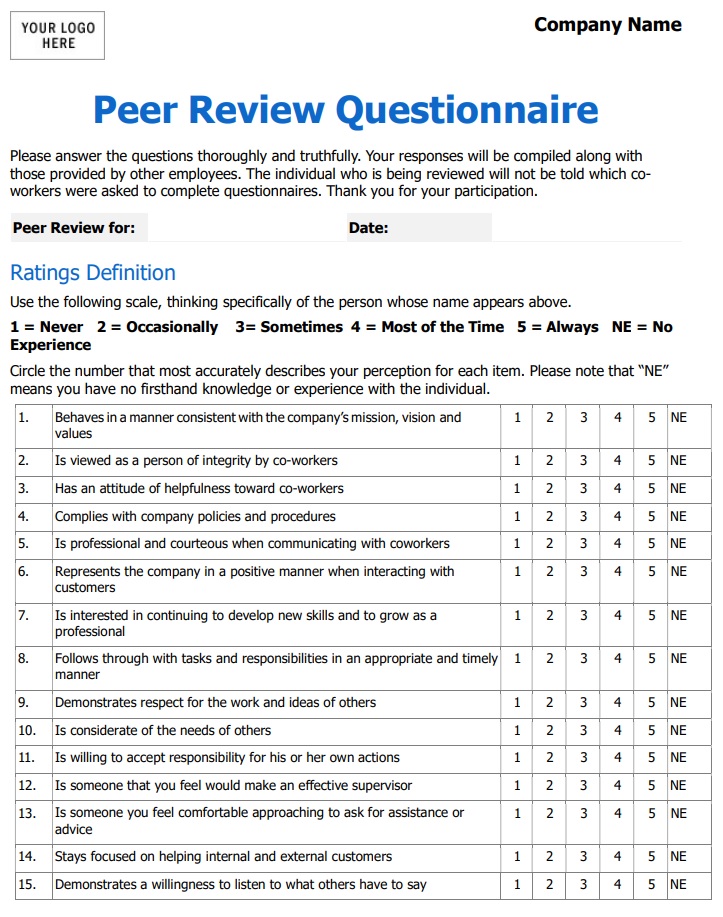
4. Peer Review Form
Peer review is commonly used in academic and professional fields but it can also be applied in other areas. The premise is simple: Co-workers and managers assess the employee’s behavior and professional qualities.
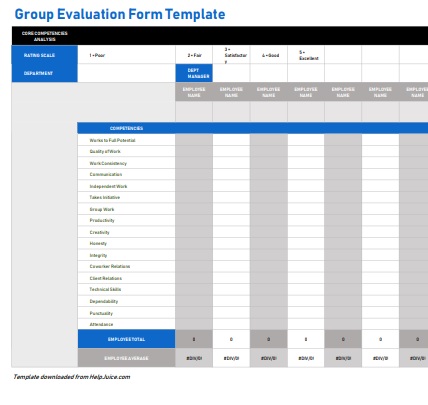
5. Group Evaluation Form
This job evaluation form can help understand team performance at scale. It uses a numerical scale to rate results, communication, adherence to deadlines and other key factors.
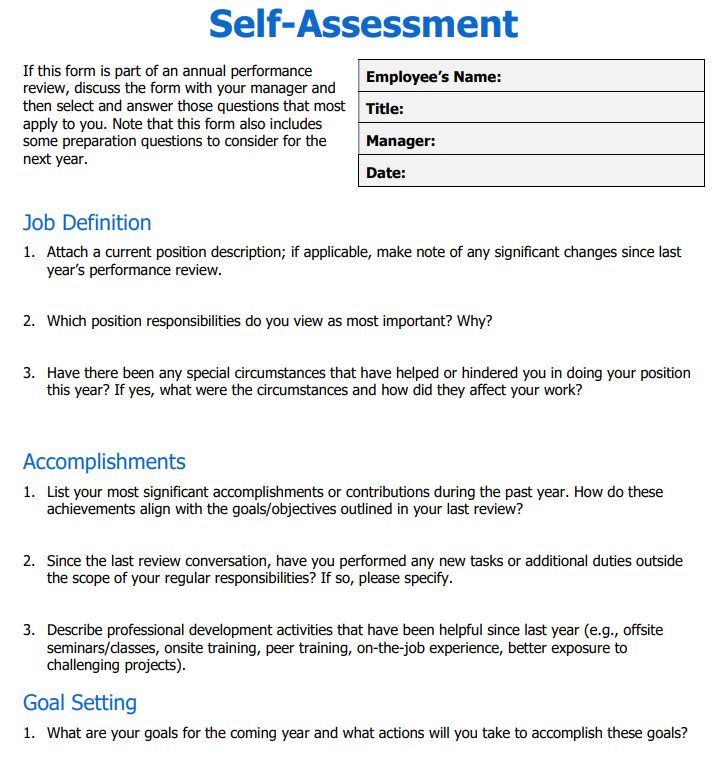
6. Employee Self-Evaluation Form
This self-assessment form is sometimes used in conjunction with an annual performance review template filled by the manager. The goal is to gain a better, unbiased overview of the employee’s abilities, actions, and quality of work.
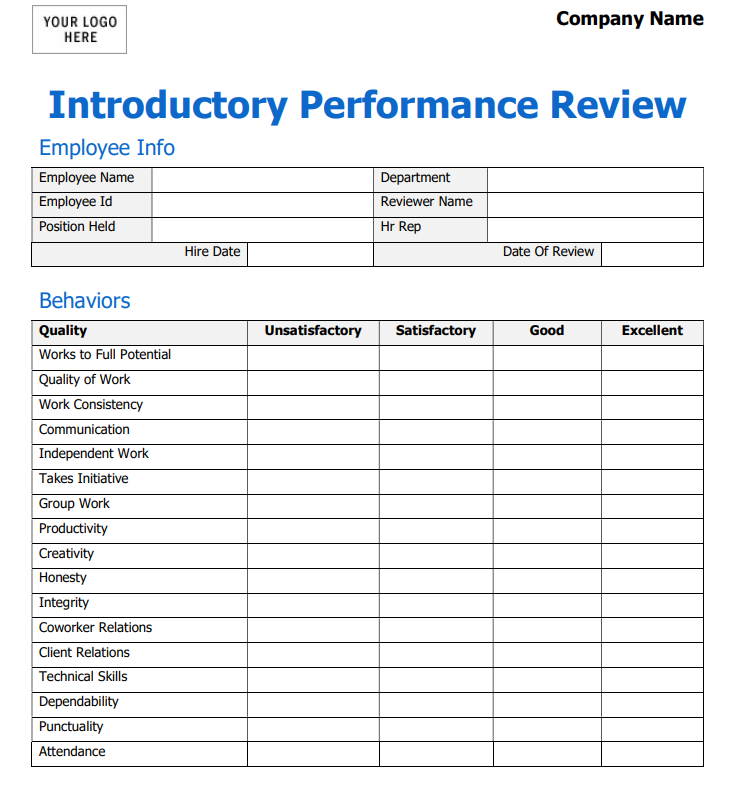
7. Introductory Period Performance Review Template
After employee onboarding is complete, this evaluation template can help determine if the new hire is a good fit for his or her current position as well as the company.
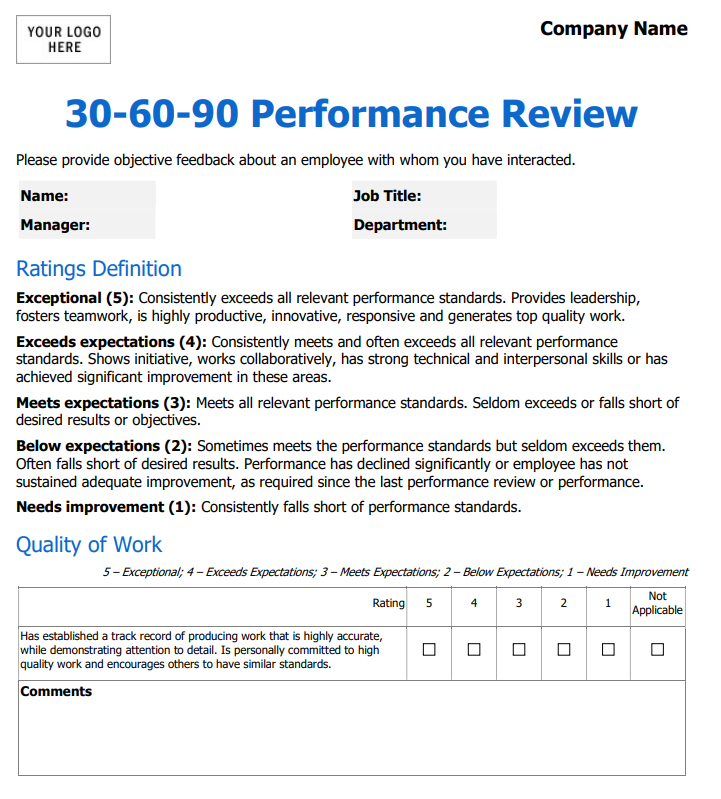
8. 30-60-90 Review Template
A 30-60-90-day template is an employee evaluation form that focuses on the employee's performance during the first 90 days of their employment. The purpose of a 30-60-90 day plan is to set clear expectations and goals for the new employee, provide them with a roadmap for success, and evaluate their progress during their first few months on the job. This evaluation form is commonly used for new hires or employees who are transitioning into a new role.
The template typically includes sections for the employee to set goals and objectives for their first 30, 60, and 90 days on the job. The employee outlines specific actions they plan to take during each phase, including tasks to complete, skills to learn, and relationships to build. The template also includes sections for the employee to reflect on their progress towards these goals and for the manager to provide employee feedback and guidance.
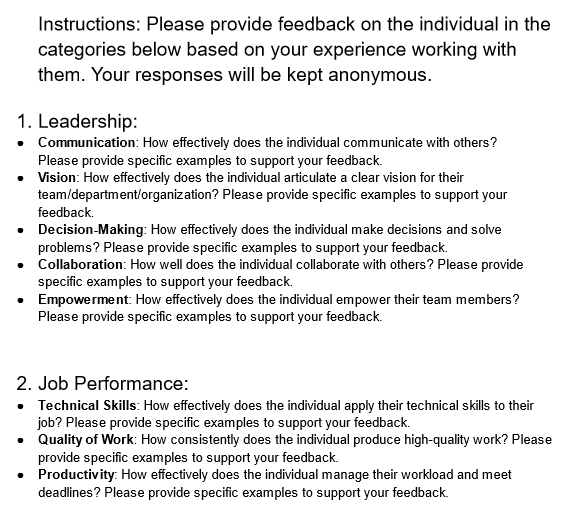
9. 360 Degree Feedback Form
A 360-degree feedback form is an employee evaluation form that gathers feedback from a variety of sources. This feedback may include input from the employee's supervisor, peers, direct reports, and even external stakeholders such as clients or customers. The goal of a 360-degree feedback form is to provide the employee with a more complete understanding of their strengths and weaknesses, as well as areas for improvement.
The 360-degree feedback form typically includes questions about the employee's job performance, communication skills, leadership abilities, and other relevant competencies. The questions may be open-ended or use a rating scale, and respondents are typically asked to provide specific examples to support their feedback. The feedback is collected anonymously to encourage honesty and candor.
The use of a 360-degree feedback form can be a valuable tool for organizations looking to improve employee performance and foster a culture of continuous improvement.
Wrapping Up
And there you have it. That’s where we’re going to give this thing a wrap.
Employee evaluation forms help businesses evaluate and measure the performance of their employees and keep everything on record. They are a standardized method of measuring performance for purposes such as confirming employment, giving promotions, raises, etc.
In the post above, we’ve discussed the different parts that these forms contain, how you can make them, and what best practices you can follow.
FAQs
When should an employee evaluation form be used?
Employee evaluation forms are used during annual or semi-annual performance reviews, at the end of a probationary period, before promotion decisions, after major projects, or when performance issues need formal documentation. Any situation that requires a structured, recorded assessment of an employee's performance is a valid use case.
Do employee evaluation forms make sense for small businesses?
Yes. Small businesses benefit from evaluation forms for the same reasons large ones do: consistency, documentation, and clarity. A simple one-page form used regularly beats informal check-ins that never get recorded. The form doesn't need to be complex to be effective.
What should an employee evaluation form include?
A complete form covers personal information, performance ratings across core competencies, a review of previous goals, new goals for the next cycle, strengths, areas for improvement, training needs, a self-assessment section, manager comments, and signatures. The level of detail scales with the role and the purpose of the evaluation.
What should I write in the comments and feedback sections?
Feedback should be specific and behavior-based. Vague comments like "great attitude" or "needs improvement" are not actionable. Reference observable behavior and real examples from the review period. The more concrete the feedback, the more useful it is for the employee to act on.
How do you prepare for an employee performance review?
Review the employee's previous evaluation, check which goals were set, and go through any documented feedback or notes from the review period. Send the self-assessment to the employee a few days in advance. Prepared managers run better reviews, and employees who come in with context engage more honestly.
Can the same evaluation form be used across every role?
It can, but it shouldn't. A generic form applied to every position misses role-specific competencies that actually matter. The core structure can stay consistent, but the competencies and goals should be tailored to reflect what good performance looks like in each specific role.


.png)


