Introduction
Standard operating procedures (SOPs) are important for the smooth operational running of any business. SOPs define the steps and sequence that have to be followed when a certain process or task is performed.
They can provide information for something as simple as collecting employee feedback after a midday meeting, or for something as advanced as manufacturing intake exhausts for a car.
In this guide, we’re going to guide you in detail about what SOPs are (we already gave quite a bit of info, but there’s more), why they are important, what components they consist of, their common use cases, how to write them, and a lot more. This is your go-to comprehensive guide on SOPs by Helpjuice.
Let’s get started.
What is a Standard Operating Procedure (SOP)?
SOP stands for Standard Operating Procedure. An SOP is a documented process that outlines step-by-step instructions to complete a task consistently and correctly.
Organizations use SOPs to improve efficiency and maintain quality standards. They also help to reduce errors and ensure compliance with regulatory requirements.
SOPs can be used for processes such as:
- Employee onboarding and training
- Customer service and support workflows
- Manufacturing and production processes
- Quality control and assurance procedures
- IT support and system maintenance
- Sales and lead management processes
What is the Difference Between an SOP and a Process Document?
The main difference between an SOP and a process document is that a process document gives a broad overview of a certain process, while an SOP contains detailed steps.
For example, let’s say a digital marketing agency wanted to publish some content. A process document about it would simply state things like publish content, share with the team, follow up on engagement metrics, suggest revisions, etc.
On the other hand, an SOP would detail each step. How the content has to be pasted into the CMS, how the tags have to be assigned to the content, how it has to be linked with other content, and so on.
In comparison to a process document, an SOP is very detailed and granular.
Importance of SOPs for Businesses
SOPs are important for businesses because they help standardize tasks and reduce errors.
To understand the importance of SOPs for businesses, it’s easier to simply look at the benefits they provide and know that without said benefits, things can be quite difficult.
Benefits of Implementing Standard Operating Procedures
Let's take a closer look at the specific benefits that SOPs bring to a business.
- Ensures Adherence to Best Practices. An SOP turns best practices from suggestions into clear steps, making sure your team always works in the company's best interest. SOPs provide detailed instructions to guide your team, helping them achieve great results while saving resources.
- Ensures Consistency and Efficiency. A standard operating procedure is the blueprint for making your organization run like a finely-tuned machine. It establishes consistency in your operations, making decisions and processes more automatic, thus eliminating unnecessary deliberations or miscommunication.
- Reduction of Misunderstandings. SOPs provide clear, detailed instructions on task execution, ensuring everyone is on the same page and reducing potential misunderstandings. This fosters effective communication within the team.
- Enables Proper Onboarding and Training. Clearly defined standard operating procedures make employee onboarding easier as well as improve how you train your team members on best practices. With detailed steps and contingency plans, employees are better prepared to handle challenges.
- Preservation of Organizational Knowledge. Although your current team might be well-versed with the SOPs, it's crucial to document them for future reference. Changes in your team are inevitable - retirement, resignation, promotions, leaves, etc. When changes happen, documented SOPs retain knowledge and expertise within the company for new members.
- Quality Assurance. By ensuring adherence to best practices and maintaining consistency, SOPs enhance the overall quality of work. The workers can effectively and efficiently complete a process or task, raising the quality bar.
- Regulatory Compliance. Certain industries legally require SOP documentation. Well-documented SOPs demonstrate compliance with regulatory requirements, such as adherence to the Joint Commission's standards in healthcare. They also help fulfill general legal obligations, like customer complaint resolution, by outlining necessary steps to meet the terms of service.
- Improved Safety. SOPs detail safe practices and procedures, reducing the risk of accidents or injuries. For example, an SOP for handling hazardous materials includes steps for appropriate protective gear and handling techniques, ensuring safety and proper risk assessment.
How to Write an Effective Standard Operating Procedure
Alright, we've tackled the basics: we understand what a standard operating procedure (SOP) is and why they can be such a game-changer when effectively creating and implementing them.
Are you ready for the next step? Let's dive in and uncover how to write an SOP that your team will actually want to use.
Sign up for a 14-day free trial and see how Helpjuice's knowledge base software can help organize your SOP's and improve your internal processes. Body
Below are the general steps to take when writing a standard operating procedure.
- Determine Your Goals for Creating an SOP
- Determine the Stakeholders and Creators
- Define the End-User
- Determine the Scope and Format of the SOP
- Gather All Information
- Determine What Should Be Included in Your SOP
- Review the Written Document
- Train Your End-Users
- Test and Tweak the SOP in Practice
- Implement the SOP and Revisit Regularly
Now, let's dive deeper into the actual process of crafting effective standard operating procedures.
The steps we discuss below are based on our extensive experience and proven success in developing SOPs here at Helpjuice. Our goal is to share our best practices with you, so that you, too, can create and implement SOPs that streamline your internal processes.
1. Determine Your Objectives for Creating an SOP
Before the pen hits the paper, or fingers touch the keyboard, you should have a clear-cut answer to the question of why you're creating this document. It's like preparing for a road trip; you need to know your destination before you can plan your route.
Here are some usual objectives that businesses have in mind when they create an SOP.
- To standardize processes across the organization
- To ensure consistency in task execution
- To improve efficiency and productivity
- To reduce errors and variability
- To support the training and onboarding of new employees
- To maintain quality control and compliance
- To document best practices and institutional knowledge
- To enhance accountability and responsibility
- To meet regulatory or legal requirements
- To enable easier auditing and performance evaluation
Actionable Step: Set up a meeting with your team to brainstorm and finalize your SOP objectives. Make them SMART goals, and you're off to a great start!
Pro Tip: Consider using a knowledge base tool at this stage—and throughout the entire process—to enhance your team's productivity and keep all documentation stored and organized.
2. Determine the Stakeholders and Creators in the SOP
The next thing you need to do is determine the stakeholders and creators for the SOP. You need to chalk out who gets a say in the SOP, as that will impact the direction, feasibility, and overall effectiveness of the document. Different people bring different perspectives to the table, and knowing who to involve early on saves a lot of back-and-forth later.
Here are the key stakeholders typically involved in the process:
- C-level executives – provide high-level direction and ensure the SOP aligns with broader business goals and operational priorities.
- Management leaders – translate that direction into actionable plans, develop best practices, and oversee the implementation process.
- Ground-level employees – offer on-the-ground insight into whether the SOP is realistic, practical, and workable within day-to-day operations.
Actionable Step: List down all the possible stakeholders for your SOP, along with their respective roles.
Note: Not every stakeholder will have the same level of involvement. Some will be active contributors in the creation process, while others will simply be informed of the final document. Being clear about who does what from the start keeps the process organized and avoids confusion down the line.
3. Define the End-User
Before anything else, you need to have a clear idea of who within your organization the SOP is being created for. While many people may help create an SOP, it is ultimately used by specific employees or departments. For instance, an SOP for customer service requests would be mainly used by customer service reps.
Knowing your end-user upfront shapes every decision that follows. It helps you:
- Stay focused on the actual duties and responsibilities of the person using the SOP
- Use the right language and terminology that they are already familiar with
- Explain concepts where needed, without over-explaining processes that are second-nature to them
The clearer you are about who you are writing for, the more practical and useful the final document will be.
When defining your end-user, keep these key factors and steps in mind:
- Understand their daily tasks and responsibilities
- Assess their level of experience and expertise
- Determine their familiarity with the process
- Consider the terminology and language they commonly use
- Evaluate their technical knowledge or skill level
- Identify any training needs or knowledge gaps
- Understand how frequently they will use the SOP
- Consider the environment in which they will apply it
- Account for any compliance or role-specific requirements
4. Determine the Scope and Format of the SOP
Determining the scope of an SOP involves considering several factors. First, think about who will be using the SOP, as discussed in the previous step. Next, identify what equipment or materials are needed. Finally, consider any other factors that may affect the task or process described in the SOP.
When it comes to formatting, a standard operating procedure typically falls into one of the following categories:
- Step-by-step written list
- Hierarchical list
- Flowchart
- Simple checklist
- Video
- Interactive course
Determine which format will best communicate the information based on the procedures you are documenting.
For instance,
- A step-by-step written list works well for straightforward, linear tasks with little variation
- A hierarchical list is useful when tasks involve multiple levels, sub-steps, or dependencies
- A flowchart is ideal for processes with decision points or multiple possible outcomes
- A simple checklist suits routine tasks where users just need quick confirmation of completion
- A video is effective for visual demonstrations or hands-on procedures
- An interactive course is best for complex processes that require training, practice, or assessment
The best course of action here is to go with the simplest format necessary for the circumstance at hand.
5. Gather All Information
After performing the steps mentioned above, the next thing that you need to do is gather the information that is required to create the SOPs.
Here are the steps that you can follow to do so:
- Research the task or process: Look for relevant information about the task or process that the SOP will cover. This may include industry guidelines, best practices, and any relevant policies or procedures.
- Consult subject matter experts: Seek input from individuals who have expertise in the task or process that the SOP will cover. These individuals may be able to provide valuable insights and information that will help you create a more comprehensive and accurate SOP.
- Review existing policies and procedures: If there are any existing policies or procedures that relate to the task or process described in the SOP, be sure to review them and incorporate any relevant information into the SOP.
- Observe the task or process: If possible, observe the task or process being performed to get a better understanding of the steps involved and any challenges or issues that may arise.
This stage should not be rushed. The quality of your SOP depends heavily on the accuracy and depth of the information you gather. Skipping steps or relying on assumptions can lead to gaps that reduce its effectiveness.
It’s also important to avoid depending on a single source of information. Relying on one perspective, even if it’s from an expert, can introduce bias or overlook critical details. Instead, combine insights from multiple sources such as documentation, subject matter experts, and direct observation.
Taking the time to validate and cross-check your information will result in an SOP that is both reliable and practical in real-world use.
6. Outline the SOP Document, Then Start Writing
With your information gathered, the next step is to organize it into a clear structure and begin drafting the SOP.
Start by outlining the process in a logical sequence. Map out the major steps first, then layer in supporting details where needed. This helps you see the full flow before getting caught up in wording.
As you begin writing, keep these tips in mind:
- Write in a task-oriented way: Focus on what needs to be done, not long explanations.
- Keep steps clear and specific: Each step should describe one action and be easy to follow.
- Use consistent language: Stick to the same terms throughout to avoid confusion.
- Write for the end-user: Keep their skill level and familiarity in mind as you draft.
- Avoid overcomplicating early drafts: Prioritize clarity. Refinement can come later.
Further on in this guide, we’ll talk about the exact parts and sections that should be included in an SOP document.
7. Review and Finalize the SOP
The last thing that you need to do before the SOP is finalized is review it thoroughly. You have to check and see if it is clear and correctly written, and that all the information it contains is accurate.
As you review, keep these points in mind:
- Validate accuracy: Ensure the SOP reflects the intended process correctly
- Check for clarity: Instructions should be straightforward and unambiguous
- Eliminate gaps: Make sure no critical steps are missing
- Remove unnecessary detail: Keep it concise and focused on execution
- Ensure consistency: Use uniform terminology, formatting, and structure
8. Test, Finalize, and Distribute the SOP
After reviewing the SOP, the next step is to test it in a real or simulated environment.
Have someone from the intended audience follow the SOP exactly as written. This helps uncover any issues that it might contain, such as missing steps or unclear instructions.
Once testing is complete, refine the document based on feedback. Make corrections where they are needed, and then finalize everything.
At this stage:
- Incorporate feedback from testing to improve clarity and accuracy
- Finalize formatting and structure to ensure consistency
- Get necessary approvals from stakeholders or management
- Distribute the SOP to the relevant team and ensure it is easily accessible
At this point, your SOP is ready for use in real-world operations.
What to Do After Creating Your SOP
Creating an SOP is only the first step. In order to make sure that it remains effective, it has to be constantly monitored and improved. You also need to make your team aware of it so that it can be adopted.
Here are some of the things that you should do:
- Train your team: Walk end-users through the SOP, especially if the process is new or complex
- Ensure accessibility: Make sure the SOP is easy to find and use during day-to-day work
- Encourage adoption: Reinforce its use so it becomes part of regular operations
- Monitor effectiveness: Identify where users struggle or where the SOP may fall short
- Update regularly: Revise the SOP as tools, processes, or requirements change
- Version control: Keep track of updates so everyone is working with the latest version
Main Parts of an SOP Document
We mentioned above how you have to write the SOP document using consistent terms and keeping the steps clear, etc.
Now, let’s talk about the actual parts of the document that you have to cover.
Title Page
The title page of your standard operating procedure should contain identifying information regarding the document, including:
- The SOP is being documented
- The document’s unique identification number
- The date of creation and/or editing of the document
- The department or professional title of the entity that will implement the SOP
- The names and titles of the individuals who created the document
Here is an example of what a title page can look like in an SOP.

(Source. Example of SOP Title Page From Georgia's Department of Natural Resources' HR Team)
Table of Contents
If necessary, you can include a table of contents after the title page of your SOP, as this will help those who use the document find the information they’re seeking with relative ease.
This may only be necessary if the SOP document is longer than a page or two. Basically, if the end-user is able to quickly and easily find the information they need without a table of contents, you likely don’t need to include it in the document.
Preparatory Information
As we’ve discussed, certain information will need to be laid out in full in order for your team to be able to adhere to the SOP to be described momentarily.
This preliminary information includes:
- SOP Purpose: Here, you’ll explain your team’s rationale for creating the SOP document. This means explaining the high-level and “on-the-ground” impact you hope the SOP to have on your organization, as well as the actual standards to be met by implementing the SOP.
- Roles and Responsibilities: In this section, you’ll identify the specific employees or stakeholders to be involved in a given process. Moreover, you’ll also define the capacity of these individuals within your organization, as well as the role they play in the SOP in question.
- Resources and Materials: The individuals responsible for completing the procedure will likely need to use a variety of tools, technology, and other materials throughout the process. Here, you’ll define what these resources are, and any other necessary information about them (e.g., where to find them within your facilities, how to store them properly, and how and when to request maintenance if need be).
- Cautions, Warnings, and Other Hazard-Related Info: If any safety precautions exist with regard to the aforementioned resources, or to the overall procedure in question, it’s imperative that you lay them out clearly, here. This information should also be present within the SOP documentation to follow, with clear indicators of how to find more information if needed.
Methodology and Procedures
This section is, of course, the most important part of the overall SOP document, as it’s where you’ll describe the actual operating procedures to be followed at all times when completing a certain task.
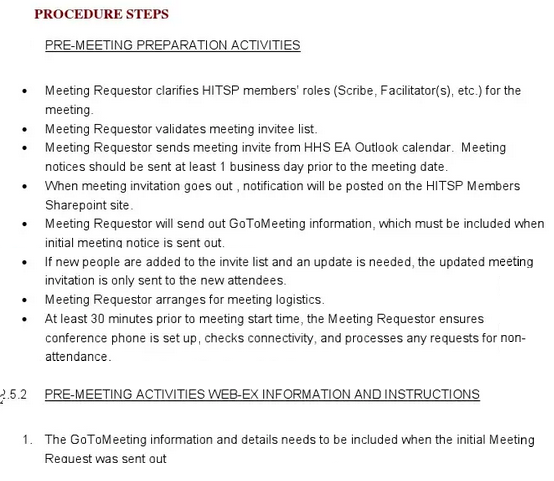
Using the chosen format, your task here will be to write detailed, step-by-step instructions for the end-user to follow at every touchpoint. In more simplified cases, these steps will be sequential; in others, the process may involve sub-steps, recursive processes, decision trees, and the like.
Here is an example of what this can look like.

(Source. Example of Procedural Steps From NC State University)
As we’ve discussed, it’s essential to be as detailed and clear as necessary throughout this section of the SOP. The goal is to use as specific language as is needed to communicate instructions in full—and to minimize any ambiguity that may exist within said instructions.
(To that point, it’s worth noting that you only need to be specific enough for the intended audience to understand the instructions in question. In other words, there’s no need to be specific to the point of being pedantic; make your instructions clear, and then allow the end-user to get to work.)
Depending on the procedure in question, you’ll also want to include any diagrams, illustrations, or other imagery that may supplement your written documentation. In fact, it may be more effective and efficient to use such illustrations in certain circumstances where the written word simply doesn’t suffice.
References and Glossary
You’ll likely refer to a variety of terms, resources, and other documents throughout a given SOP that may require further explanation.
In this section, you’ll be able to either provide this explanation in the necessary detail or point your audience toward additional resources or documentation for further explanation. This will allow you to maintain a singular focus within the current SOP document, while also providing the opportunity for the end-user to dig deeper into a given topic should they need to do so.
Tips and Best Practices When Creating SOPs
We’ve mentioned the detailed steps on how to create SOPs above. Other than those steps, there are a number of best practices and tips that you should keep in mind to make sure that the final document comes out perfect.
- Keep it simple. The goal of an SOP is clarity. If the person reading it has to stop and think about what a step means, the document has already failed. Use plain language, short sentences, and avoid jargon wherever possible.
- Write for the person doing the work. It is easy to write an SOP from the perspective of someone who already knows the process. The problem is that the person using it often does not. Always write with the end-user in mind, not the expert who created it.
- One step, one action. Each step in your SOP should describe exactly one thing. Combining multiple actions into a single step creates confusion and increases the chance of something being missed.
- Use visuals where words fall short. Some processes are easier to show than to explain. Screenshots, diagrams, and flowcharts can cut through complexity faster than a paragraph ever could. Do not hesitate to use them.
- Get input from the people actually doing the job. The best SOPs are written with input from the people who perform the process daily. They will catch gaps and flag steps that look fine on paper but do not hold up in practice.
- Treat it as a living document. An SOP written once and never touched again is one that slowly becomes inaccurate. Build in a regular review schedule and update it whenever the process, tools, or requirements change.
Examples of SOP Documents
Here are some example SOP documents that you can view to get an idea of how your document should look:
Example 1: Employee Onboarding SOP
Title Page: SOP Title: New Employee Onboarding Procedure
Document ID: HR-SOP-001
Date: January 2024
Department: Human Resources
Created by: HR Manager, People Operations Lead
Purpose: To ensure every new hire goes through a consistent and structured onboarding experience, from the day their offer is accepted through the end of their first 30 days.
Roles and Responsibilities: HR Manager -- owns the process and ensures all steps are completed on time. Direct manager -- handles day-one orientation and the 30-day development plan. IT department -- responsible for equipment setup and system access before the employee arrives.
Resources and Materials: Employee onboarding checklist. Company handbook. IT access request form. HR management system. 30-day plan template.
Cautions and Warnings: System access must be set up before the employee's first day. Delays in access provisioning directly impact day-one productivity. All paperwork must be completed before payroll can be processed.
Methodology and Procedures:
Step 1: Pre-arrival. HR sends the welcome email with first-day logistics. IT completes laptop setup and creates all system credentials. Manager prepares the 30-day plan and schedules week-one check-ins.
Step 2: Day one. Employee completes all required HR paperwork. IT walks the employee through equipment and system access. Manager conducts office tour and introduces the team.
Step 3: Week one. Employee completes mandatory compliance training modules. Manager holds a daily 15-minute check-in. HR confirms all access and tools are functioning correctly.
Step 4: Days 8 to 30. Employee completes role-specific training. Manager holds weekly one-on-ones. HR schedules the 30-day review meeting in week three.
References and Glossary:
HRIS: Human Resources Information System used to manage employee records.
Compliance training: mandatory modules required by company policy before the employee can operate independently.
30-day plan: a structured document outlining the new hire's goals, training milestones, and expectations for their first month.
The above are the textual details that would be included in the SOP. Here is an image showing how it would appear in the form of a document:

Example 2: IT Support Ticket Resolution SOP
Title Page: SOP Title: IT Support Ticket Resolution Procedure
Document ID: IT-SOP-004
Date: March 2024
Department: Information Technology
Created by: IT Manager, Level 2 Support Lead
Purpose: To ensure all IT support tickets are triaged, handled, and resolved consistently, within agreed response times, and with full documentation of every action taken.
Roles and Responsibilities: Level 1 support -- handles initial ticket receipt and triage. Level 2 support -- handles escalated issues that Level 1 cannot resolve. IT Manager -- reviews any ticket open longer than 48 hours and intervenes where necessary.
Resources and Materials: IT ticketing system. Known issue database. Escalation log. Internal IT knowledge base. User notification email templates.
Cautions and Warnings: Critical priority tickets must be acknowledged within 30 minutes regardless of business hours. No ticket should be closed without user confirmation that the issue is resolved. Escalations must include full notes from Level 1 to avoid the user repeating themselves.
Methodology and Procedures:
Step 1: Ticket received. Acknowledge the ticket within one hour. Categorize by priority: Critical, High, Medium, or Low. Assign to the appropriate Level 1 agent.
Step 2: Initial triage. Level 1 agent searches the known issue database for a matching resolution. If a solution is found and applied, document it and move to Step 5.
Step 3: Escalation. If Level 1 cannot resolve the issue within two hours, escalate to Level 2 with full notes attached. Notify the user that their ticket has been escalated and provide an updated estimated resolution time.
Step 4: Resolution. Level 2 resolves the issue and documents the fix in detail. User is notified and asked to confirm that the issue is fully resolved before the ticket is closed.
Step 5: Closure. The ticket is marked closed in the system. Resolution is logged to the knowledge base for future reference. If the issue was recurring, flag it for the IT Manager for root cause review.
References and Glossary: SLA -- Service Level Agreement defining the maximum response and resolution times per priority level.
Known issue database: internal repository of previously documented issues and their resolutions.
Escalation log: a record of all tickets escalated from Level 1 to Level 2, used for performance tracking.
Like the previous one, the above are the textual details that would be included in the SOP. Here is an image showing how it would appear in the form of a document:

Templates for SOPs
If you want to get started with making an SOP but still aren’t really sure about how to do it, you can take some help from a template.
Here on Helpjuice, there is a detailed list of SOP templates that we’ve published, accessible at the attached link.
However, here is one template that you can view and use at the same time:
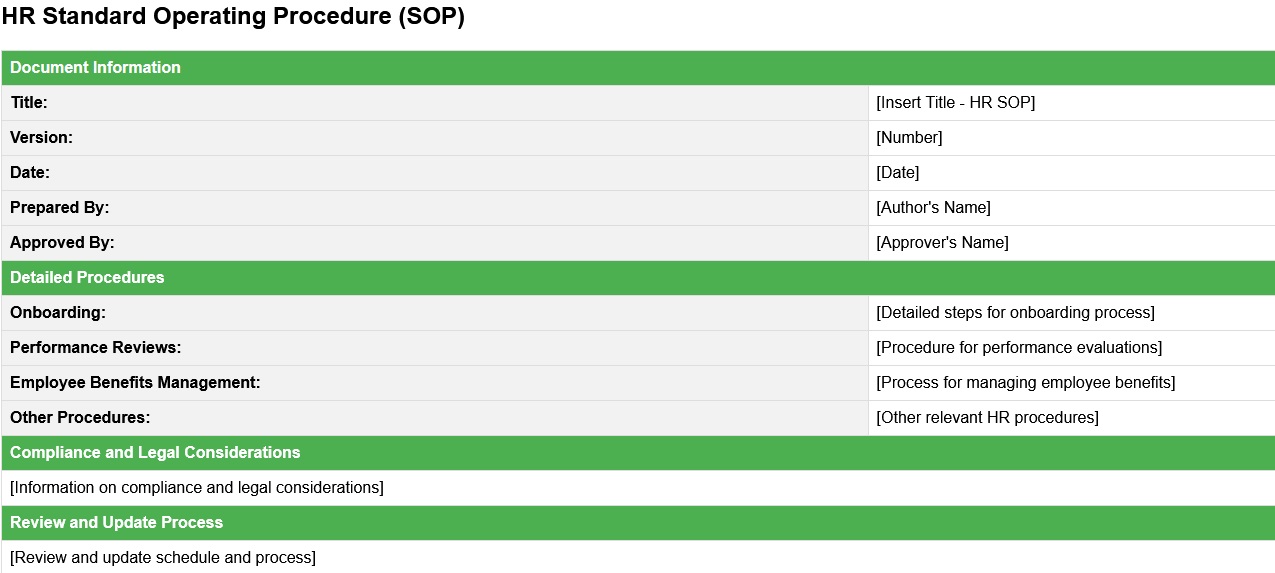
HR Standard Operating Procedure Template
For HR teams, a well-structured SOP is vital for documenting processes such as onboarding, performance reviews, and employee benefits management. This HR SOP template offers a comprehensive guide from start to finish, outlining responsibilities and timelines for each step. Organized and accessible, it's a key tool for fostering positive workplace relationships and enhancing the overall employee experience.
For HR teams... a well-structured SOP is vital. Use a dedicated HR knowledge base platform.
Common SOP Formats
While companies are free to develop their internal SOP documents in a format that works best for their team, in our experience, most organizations choose from one of the following standard operating procedure formats.
1. Step-by-Step Written Format
In some cases, it may be sufficient to create a simple numbered or bulleted list of steps to take when completing a process.
This format should be used only when the process in question is straightforward and, in the vast majority of circumstances, can be completed without fail.
Processes in which a step-by-step format is likely sufficient include:
- Setup and cleanup instructions
- Digital login sequences
- Instructions for proper and safe use of equipment
2. Hierarchical Format
The hierarchical format for SOPs borrows from the above format in that it involves listing the steps of the process to be completed.
However, hierarchical SOPs provide additional details within each step as deemed necessary. While a purely step-by-step SOP will list steps 1, 2, 3, and so forth, a hierarchical SOP may include Steps 1a and 1b; 2a, 2b, 2c; 3a, 3b.
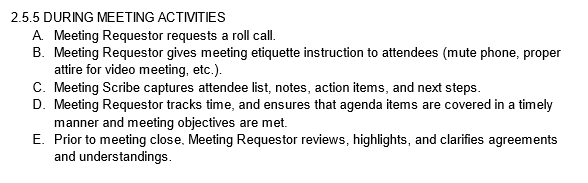
The hierarchical format is used when more instruction may be needed in order to sufficiently complete a given task. As a simple example, if Step 1 tells team members to log into their account, Step 1a may direct individuals to input their username, with Step 1b directing them to input their password.
3. Flowchart Format
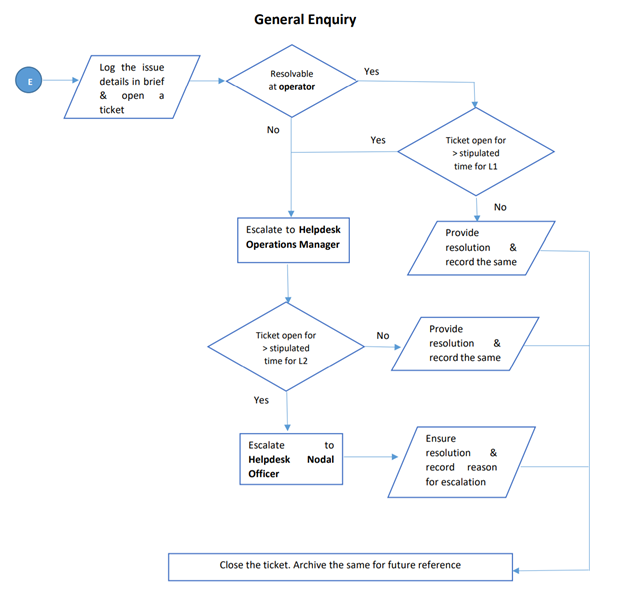
Flowcharts are best used to illustrate SOPs when multiple outcomes are possible at certain points throughout the process.
In such cases, the outcome of one step will impact the way in which the team will need to approach each subsequent step.
Take a look at the following workflow, for example:
(Source)
Note that, in this example, there are multiple times in which a decision must be made as to how to proceed. Basically, each subsequent step depends on the outcome of the previous step—and it simply wouldn’t be logical to follow certain paths if a contrasting outcome were to come about.
4. Checklist Format
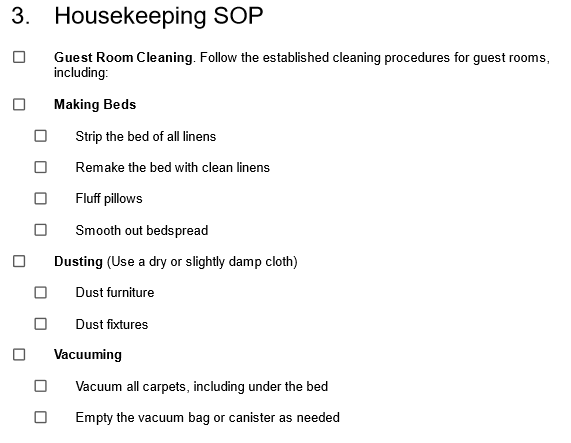
Checklist SOPs are presented as a simple list of steps that need to be followed in order. This can be a helpful format for SOPs that involve repetitive tasks or that need to be completed quickly.
5. Video Format
A video standard operating procedure is a visual guide that uses video footage to demonstrate how to complete a specific task or process. Video SOPs can be an effective tool for training and onboarding new employees, as they allow workers to see exactly how a task should be performed. They can also be useful for documenting and standardizing processes, as they provide a clear, visual representation of the steps that need to be followed.
Video SOPs can provide a more interactive and engaging way to learn than written SOPs as viewers can see how tasks should be performed, rather than just reading about them. This format is particularly useful for workers who are visual learners or who prefer to learn through demonstrations.
6. Interactive Course
SOPs can be formatted as an interactive online course, combining written instructions, video demonstrations, and quizzes to guide users through a task or process. This can be a helpful format for SOPs that need to be completed by a large number of people or that involve multiple skills or concepts.
Using Knowledge Bases for Your SOPs
Using a knowledge base to store and distribute your SOPs has many advantages and benefits. Instead of creating an SOP document and distributing it one time to your team, you can use a knowledge base instead, and keep the document stored for anyone to access and use at any time.
In a nutshell, here are the perks of using a knowledge base as a medium for storing and sharing SOPs in your organization:
- SOPs are stored in one central location, making them easy to find without digging through emails or shared drives
- Team members can access the latest version at any time, from anywhere
- Updates are reflected instantly, so no one is working from an outdated document
- New employees can self-serve during onboarding instead of waiting for someone to send them materials
- You can organize SOPs by department, topic, or role for faster navigation
- Access permissions let you control who can view or edit each document
- Search functionality makes it easy to find a specific procedure in seconds
- You can track who has read or acknowledged a document, useful for compliance
- Comments and feedback can be left directly on the document, keeping improvement suggestions in context
How Can You Use a Knowledge Base for Documenting Your SOPs?
Using a knowledge base starts with finding the right knowledge base software. But you’re already here on Helpjuice, so you don’t need to look further.
Then, you need to create an account on the knowledge base software and purchase a paid plan. Once you are done with that and you have access to your dashboard, you can follow the remaining steps, which include:
- Customizing the knowledge base according to your brand
- Adding users, such as the members of your team and the people in your organization
- Creating a space where the SOP documents will be shared
- Uploading the SOP document and ensuring that they are correctly formatted
- Adding tags and categories so that they can be easily found
- Adding users who can edit the document in the future
- Publishing and sharing the SOP with the correct access settings configured
With these steps, you can use a knowledge base for documenting your SOPs.
The Bottom Line
SOPs are very important for businesses. With the right SOPs in place, the processes in the business are undertaken and completed with consistent quality. Communication becomes streamlined, and there is generally less confusion everywhere.
In the post above, not only have we outlined what SOPs are and what benefits they provide, but we’ve gone into detail about how you can create them yourself, including how to use a knowledge base to effectively store and share them.
We’ve also detailed the formats of SOPs, provided some examples, and also provided a template that you can use.
We hope you learned a lot from this comprehensive guide. If you did, make sure to check out other related blog resources on our platform as well.